
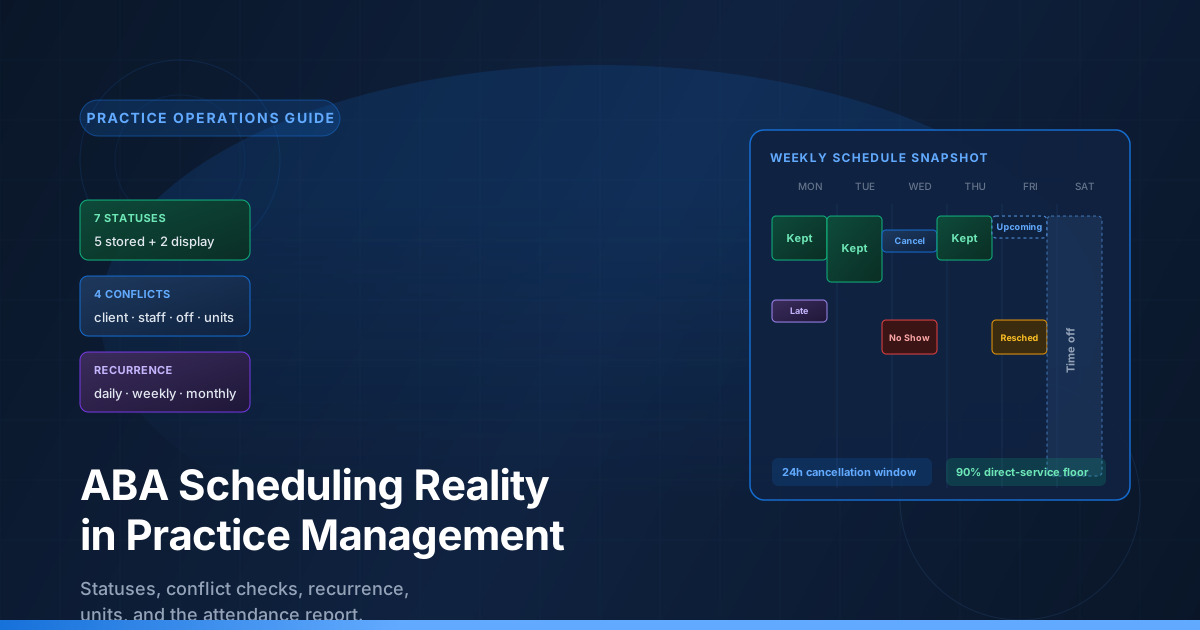
Every ABA practice eventually meets the same upstream bottleneck. The clinical team is ready to see the next client. The authorization has units left. The eligibility record confirms coverage. The session note template is staged. The only thing standing between the practice and a billable visit is the schedule — and the schedule has to answer four questions before it lets the visit through. Is the client free? Is the staff free? Is the staff off the clock? Are the authorization units still available for that date? If any of those questions comes back wrong, the appointment does not get saved, or it gets saved as a status that the biller will not be able to claim on Monday morning.
The scheduling problem is not a calendar problem. It is a coordination problem that pulls together status, availability, recurrence, authorization, and time-zone. The schedule assumes coverage is in force on the date of service. The authorization assumes the payer is the right payer for that date. The session assumes the appointment will be in a status that produces a billable event later. When any of those assumptions drifts, the practice has to choose which record is the source of truth — and the choice determines whether the visit ever produces a claim.
This guide walks through the full scheduling workflow used in Cognix Health. It explains the lifecycle status model that drives a row's downstream behavior, the four conflict dimensions that gate every save, the half-open overlap math that lets back-to-back appointments coexist, the recurrence engine that materializes a series into individual rows, the client attendance report that turns time data into a coverage percentage, and the operational practices that keep the schedule from becoming a denial factory upstream of the revenue cycle.
Complementary reading: Session Reconciliation and Billable Readiness in ABA Practice Management explains how a scheduled visit becomes a billable session. Insurance Authorizations, Service Types, and the Billable Units Chain in ABA is the upstream authorization chain that the schedule draws units from. ABA Eligibility Verification: Real-Time, Batch, and the Layer Between Coverage and Claims is the coverage confirmation the schedule assumes is in force. The ABA Claim Lifecycle: Statuses, ERA, and What Every Payer Response Actually Means is the downstream outcome a well-built schedule feeds.
What the Schedule Is Actually For
The appointment schedule is the operational layer that turns planned care into billed care. The authorization is a reservation. The eligibility record is a confirmation. The appointment is the commitment — the moment the practice says "this clinician will be with this client at this place for this duration delivering this service." That commitment is what the session later reconciles against, what the attendance report later measures, what the authorization charges units from, and what the claim later bills to the payer. The schedule is the source of truth for every revenue-cycle step that follows it.
The schedule matters because the billable timeline only opens when the right outcome is on the right row at the right moment. A future row cannot be billed (the visit has not happened). A short-notice cancellation cannot be billed to the payer the same way as a delivered visit — a late-notice cancellation is a missed session, not a delivered service. A doubly-booked row cannot be claimed (the payer would see two visits for the same client at overlapping times). A row whose only status change happened after the session was performed cannot trigger unit deduction (the authorization has already returned its units). Every status outcome is a different operational decision the biller has to make on Monday morning. The discipline that keeps the schedule honest is the discipline that keeps the revenue cycle intact.
The schedule also has to answer questions for four different audiences at once. The front desk needs to know whether to book, room, and confirm. The clinician needs to know where to be, with whom, and delivering what. The biller needs to know what status any row ended in and whether the authorization was charged. The operations lead needs to know whether the caseload is being seen, whether the schedule is being kept, and whether the recurring series are being honored or silently broken one occurrence at a time. The schedule is the single record all four audiences read, and the fields they read are the same fields — status, date, location, staff, service type, units — interpreted through four different lenses.
The Scheduling Layer at a Glance
These numbers describe the production scheduling workflow in Cognix Health as of September 2026. They are concrete and verifiable in the scheduling rules, the conflict checks, and the attendance report — not aspirational numbers about how an ABA operation should behave in theory.
The Appointment Status Lifecycle
Every appointment row carries a status that determines what happens next. The status is the row's record of what occurred at that slot — whether the visit was delivered, whether it was canceled, and if so on what notice and by whom, whether the client ever arrived, or whether the visit was moved to a different date. The status matters because it is what the biller reads on Monday morning and what the attendance report counts against on Friday afternoon. The status field is the single source of truth for downstream consumers: the biller, the auditor, the attendance report, and the authorization accounting all read the same row through the same field.
The calendar does not always display the status as the row holds it. A future row whose underlying status still reads as delivered is rendered as something to anticipate — the calendar lets the front desk see "this is on the books for next Tuesday" without the row having been moved to a different outcome. A staff time-off block is overlaid onto the calendar from a separate record, so the scheduler can see who is unavailable without the time-off ever becoming a real appointment row. Both behaviors let the calendar show a faithful view of what is on the books while the row's underlying status stays correct.
The Four Outcome Behaviors
The row's lifecycle outcome falls into one of four behaviors. Each behavior has its own effect on the authorization, on the attendance report, and on the biller's downstream claim.
A delivered visit is the outcome the practice wants most. The session was performed (or is still planned to be performed). The authorization has been charged for the visit's units. The attendance report counts the row toward the delivered-service total. If the row is later edited, the unit deduction is recomputed against the new duration; if the row is later moved to a non-delivered outcome, the units are credited back.
A missed-session outcome is the row ending in a no-show or a short-notice cancellation. In both cases the client side caused the gap — the family never arrived, or the family canceled within the 24-hour notice window so the practice could not re-fill the slot. The units are credited back to the authorization, the row contributes zero attended minutes to the attendance report, and the client is held accountable for the gap. The attendance penalty is the practice's signal that family adherence is drifting before the biller ever sees a denial. The two paths into a missed session are recorded differently so the operations lead can tell whether the family never showed or canceled too late, but they carry the same downstream weight.
An on-time cancellation is the row ending in an honest schedule adjustment. The cancellation was recorded with enough lead time that the slot could be re-filled. The units are credited back to the authorization, the row does not count toward the client's attendance percentage, and the biller does not penalize the client. The row still records who initiated the cancellation — the family calling to cancel produces a different audit trail than the practice canceling because of a staffing shortage, a clinician sick day, or a snow day. The side tag exists so a family never pays an attendance penalty for a cancellation the practice caused.
A reschedule is the row preserved when a visit moves to a new date. The original row stays in the schedule, its units are credited back, and it is excluded from the attendance denominator entirely — the system treats the reschedule as if the original visit never happened, replaced cleanly by the new visit. The new appointment at the new date counts normally, deducts units normally, and contributes to attendance normally. The original row exists so the calendar can still show that the original slot was on the books, the attendance report can exclude it cleanly, and the authorization accounting can return its units — all from the same row, with no separate "abandoned dates" table.
Why the Distinctions Matter
The four behaviors are not interchangeable. A row that ended in a delivered visit behaves nothing like a row that ended in a missed session, and the schedule cannot silently flatten them. The biller needs to know what outcome any row ended in because the authorization was charged or credited based on that outcome. The attendance report needs to know because the denominator counts only rows that were expected sessions. The schedule holds these outcomes in the row's status field so the same row serves all audiences without a separate event log or a parallel "abandoned dates" table. The status is the single field every downstream consumer reads.
Conflict Checks — The Four Dimensions
Every save on an appointment row passes through four conflict checks before the write is allowed. The checks run on the create path for new rows and on the update path for changes that move a row to a different time, staff member, or service type. A series save runs the checks for every occurrence before the first row is written.
The four dimensions are: client double-booking, staff double-booking, staff time-off coverage, and authorization units. The first three are availability checks — they ask whether anyone is free. The fourth is a capacity check — it asks whether the payer has reserved enough units for the visit.
Half-Open Intervals
Every conflict check uses the same overlap math: an overlap exists when the proposed start is strictly before an existing end AND the proposed end is strictly after an existing start. The math is half-open: a row ending at 4 PM and another starting at 4 PM do not overlap. They touch, but they do not conflict. The half-open rule is what makes back-to-back appointments (a 2-4 PM visit and a 4-6 PM visit with the same staff) coexist on the same calendar without triggering a conflict error. The same math applies in client checks, staff checks, and time-off overlays.
Client Double-Booking
A new appointment for a client cannot overlap an existing appointment for the same client with the same mapped service type. Rows that won't consume the slot are excluded from the conflict set — they cannot create a conflict because the visit will not happen. A service-type flag can also override the conflict: if the requested service is allowed to overlap with itself, the conflict is suppressed. The flag exists for cases where two clinicians legitimately deliver two services to the same client at the same time, such as a parent-training overlap with a direct-service block.
On the update path, only rows that still represent a planned visit block. Changing a single existing row cannot be blocked by a sibling that won't consume its slot. Rows that have been moved to a different date are also excluded from the conflict set on update, since the visit is no longer happening at that time.
Staff Double-Booking
A new appointment cannot assign a staff member who is already booked in an overlapping window that will still consume that time. Staff with a specific permission granted in their user profile bypass the overlap check entirely — the permission exists for clinical leads who deliberately cover overlapping shifts. The bypassing permission does not extend to time-off or to authorization unit balance; only the overlap check is affected.
On the update path, only rows that still represent a planned visit block, and only events other than the appointment being edited are eligible to cause a conflict.
Staff Time-Off
A new appointment cannot be placed inside a window where the assigned staff member is on time-off — regardless of whether that time-off is in draft, pending, or approved status. The status field exists but the conflict routine predates the status-filtering logic, so the conflict treats every time-off row as blocking. The override is at the application layer: a time-off conflict raises a confirmation-style error and the user can choose to confirm the booking anyway with an explicit bypass flag. The bypass is recorded against the booking so the operations lead can audit the cases where the schedule was overridden.
The time-off check runs in the reverse direction when a time-off row is created. Silently placing a staff member on time-off over an existing booked appointment creates a problem of its own, so the check surfaces the conflict at time-off creation time. There is no bypass on the time-off side — the operations lead has to resolve the booking side first.
Authorization Units
A billable appointment must draw units from an authorization that is in force on the date of service — that is, an authorization whose start and end dates cover the appointment window — and whose remaining unit balance can cover the appointment's units. A four-unit 97153 visit at 3 PM on March 15 has to land on an authorization that is open on March 15 and has at least four units remaining.
The check accumulates across a series. A weekly Tuesday afternoon visit running for three months draws units from the authorization three units per Tuesday (or whatever the per-occurrence unit count is) plus the same per-week into the future. If the authorization runs out mid-series, the series save rejects the entire batch — every occurrence needs to land on a balance that can support the visit, and the system will not silently cancel half a series because the authorization ended two months early.
Some service types are explicitly marked as scheduled-without-authorization. For those service types, a user with the appropriate permission can book even when the authorization is missing or short. The overage is recorded against the booking so the biller can see that the visit was scheduled under the permission and the authorization will need to be checked before the claim is built.
Unit Math — The CMS 8-Minute Rule
Sessions count their units by clock minutes on a 15-minute interval. The CMS convention is known as the 8-minute rule: the number of units is the count of full 15-minute intervals plus one more if any remainder longer than seven minutes is left over. A 38-minute visit earns three units — two full 15-minute intervals plus the eight remaining minutes above the seven-minute threshold. A 37-minute visit earns two units — two full intervals plus a seven-minute remainder, which does not cross the threshold. The remainder test runs against the leftover minutes rather than at seven-and-a-half, so the boundary is precise.
The unit count is fixed at save time. An appointment that is subsequently edited keeps its originally-deducted units until the edit returns them to the authorization, then re-deducts based on the new duration. A cancellation returns the full unit count to the authorization. A transition back from a non-delivered outcome re-validates the authorization — if the authorization no longer has units, the transition is rejected, because the schedule cannot silently commit a visit that the payer has declined to underwrite.
The Recurrence Engine
Recurring appointments in ABA are not abstract rules — they are pre-generated concrete rows. At save time, the recurrence rule is expanded into every occurrence, the rows are validated against the four conflict checks, and a single physical row is written per occurrence. The original rule is preserved alongside the materialized rows so that future edits to the rule can compare the old schedule to the new schedule and create, delete, or update only what changed.
The rule fields include the frequency (daily, weekly, or monthly), the repeat-every multiplier, the end type (a fixed date, a count of occurrences, or the end of the authorization), and a per-weekday selection with independent per-day start and end times when the frequency is weekly. Monthly rules support "on day N" or "on the Nth weekday of the month" — the latter is the "second Tuesday" form. Every rule generates a list of dates. Every date is a slot. Every slot is checked.
All-or-Nothing Series Save
A series save validates every single occurrence before any of them are written. If the 50th occurrence in a weekly Tuesday afternoon series collides with a staff vacation, the entire series save is rejected. The user gets a single error message saying which occurrence failed, and the database holds no half-written series. The all-or-nothing rule is what prevents the schedule from being left in a state where some occurrences exist and others do not — the state that would make attendance reporting and authorization accounting impossible to reason about.
Single Edit vs Series Edit
Editing a single occurrence of a series is allowed even when the rest of the series is not being touched. The single edit takes the occurrence out of the series by recording its date on the rule's broken-off list, deletes the single row, and replaces it with a standalone appointment at the new time. The series continues for everyone else. The series-edit flow, by contrast, regenerates every date, returns units for occurrences that are being removed, deducts units for occurrences that are being added, and updates the rule to match the new pattern.
A single edit cannot change the time once a session exists. The session has already written the actual times at the original slot. A time change after the session would either orphan the session or silently change what the biller is asked to claim, so the rule is locked. The reconciliation flow allows a time correction when the clinical record and the appointment have drifted, but that correction is on the actual times, not on a new scheduled slot.
Sessions Lock Series Edits
An occurrence with a session cannot be deleted or have its time changed without going through reconciliation first. The session is the clinical record of what happened — deleting the appointment would orphan the session, and changing the time would misreport when the visit occurred. The protection is what keeps the session record the source of truth for the visit while the appointment record remains the schedule for it.
The Client Attendance Report
The schedule's most important downstream report is the client attendance report. The report compares each client's projected (scheduled) appointment timing against their actual recorded session timing over the selected period. The output is a coverage percentage per client per service-code group, plus a set of column counts that flag the cases where attendance is dropping.
How the Percentage Is Calculated
The denominator of the percentage is the total projected (scheduled) minutes for every appointment that counts as an "expected" session in the period. The numerator is the total attended minutes — the overlap between the scheduled window and the actual recorded session window, capped at the scheduled end. Late arrivals reduce the percentage because the actual start is later than the scheduled start. Early pickups reduce the percentage because the actual end is earlier than the scheduled end. Late pickups cannot push the percentage above 100 percent because the overlap is clipped to the scheduled end.
Appointments in the denominator include delivered visits (which contribute the overlap), client-side missed sessions (which contribute zero attended minutes), and client-initiated on-time cancellations (which also contribute zero). Staff-initiated cancellations and rows moved to a different date are excluded entirely — they do not count as expected sessions against the client.
The Breach Threshold
The report surfaces a breach when the direct-service attendance percentage for a client drops below 90 percent. The 90 percent is the operations-level floor that most U.S. ABA contracts reference for family adherence. Other service-code groups (assessment, protocol modification, parent training) get their own attendance percentages but are not flagged as breaches — those tracks operate on different schedules and different adherence rules.
The Late-Day Columns
Two column counts flag the cases where attendance is dropping at the beginning and end of the day. A "late to first appointment" count adds one for every distinct day the client checked in 10 minutes or more after the scheduled start of their first direct appointment. A "late to last appointment" count adds one for every distinct day the client was picked up five minutes or more after the scheduled end of their last direct appointment. Both columns count only delivered direct appointments, and only the first and last appointment of each day — mid-day transitions between staff are never counted. The day boundary is in the organization's timezone, not the clinician's browser.
Best Practices
- Schedule recurring visits in a single series save rather than as six months of individual appointments. A series save lets one edit cover future occurrences. Six months of individual rows are six months of separate rows that have to be edited one at a time, which is how the schedule ends up with a Jan/Feb swap that the March rows never got.
- Capture the cancellation initiator every time a row is canceled. A row without a recorded initiator is treated as unknown and gets excluded from attendance. When the client genuinely missed the visit, a missed months-end attendance review is the difference between recoverable hours and a denied service.
- Run the client attendance report monthly, not quarterly. A monthly cadence catches a single bad week before it becomes a trend. Quarterly reviews discover problems three months after they were soluble.
- Use half-open scheduling when stacking back-to-back visits with the same staff. A 2-4 PM visit followed by a 4-6 PM visit is two independent appointments with the same clinician, not a conflict. The half-open math lets them coexist. Stacking them as a single 4-hour visit consumes more authorization units than the work calls for and creates a session that the biller has to split later.
- Check authorization units before extending a series. A weekly Tuesday afternoon series running past the authorization end date will save only if the authorization is in force on every occurrence. Confirm the authorization window or the recurrence end date before extending — otherwise the series save will fail and the user will not know which occurrence caused the rejection.
- Run a real-time eligibility check at intake and at every annual reauthorization. The schedule assumes coverage is in force on the date of service. An authorization can be live for a service the payer never intended to cover, and a family can quietly switch insurance two weeks before the visit. A six-month eligibility check is the cheapest insurance against a six-month denials queue.
Common Mistakes
How Cognix Health Supports Scheduling
Cognix Health treats scheduling as a first-class workflow, not a calendar widget. The lifecycle status model, the four conflict dimensions, the half-open overlap math, the recurrence engine, the unit accounting, and the attendance report all share the same view of the schedule — from the moment the appointment row is created through the moment the session has been reconciled and the claim has been posted.
The workflow includes:
- A lifecycle status model — every row carries a status that drives the downstream effect on authorization, attendance, and billing, with a separate calendar view that lets the front desk see future visits and staff time-off without changing the row's underlying state
- A four-dimension conflict check at every save — client double-booking, staff double-booking, staff time-off, and authorization units, all evaluated against the same half-open overlap math, so back-to-back visits coexist and full overlaps never reach the database
- A two-path escape hatch for legitimate overlaps — a permission to assign overlapping appointments for clinical leads and a per-CPT flag to allow client overlaps for grouped services, both auditable in the row's history
- A scheduled-without-authorization path — a service-type flag plus a user permission lets practices book visits ahead of an authorization decision, with the overage recorded against the booking so the biller knows to re-check before claiming
- A 24-hour cancellation threshold — on-time cancellations return units and exclude the client from attendance penalty; late-notice cancellations count as missed sessions and signal a coverage problem before the biller sees it
- A staff-initiated cancellation side tag — every cancellation records who initiated, so a staffing-shortage cancellation never lowers a client's attendance percentage the way a client cancellation does
- An eager-materialization recurrence engine — a series rule is expanded into concrete rows at save time, every occurrence is validated in one pass, and a per-occurrence save is an all-or-nothing write that does not leave the schedule half-saved
- A CMS 8-minute unit calculator — units derive from clock minutes on a 15-minute interval with the 7-minute remainder threshold, fixed at save time and recomputed on edit the same way
- A client attendance report with breach surfacing — every client gets a per-service-code attendance percentage, a late-to-first count, a late-to-last count, a late-notice cancellation count, and a breach flag below 90 percent direct-service attendance, all derived on the same record the biller reads on Monday morning
The goal is to keep the schedule honest. The front desk sees the conflict check and the cancellation initiator. The clinician sees the future row and the session lock. The biller sees the outcome of every row and the units that were actually charged. The operations lead sees the attendance report and the breach list. The payer sees the claim. The family sees the result: a kept schedule, a delivered visit, and a treatment plan that continues without interruption.
Want to see how scheduling fits your practice workflow? Contact Cognix Health to schedule a demo.
Frequently Asked Questions
How does the schedule's status model work?
The schedule's status field is a single source of truth for downstream consumers. Every row records what happened at that slot — the visit was delivered, the visit was canceled, the visit was canceled too late to re-fill, the client never arrived, or the visit was moved to a different date. The biller, the auditor, the attendance report, and the authorization accounting all read the same row through the same field. The calendar can overlay additional views on top of the row (a future visit can be shown before its start time, a staff time-off block can be shown from a separate record) without changing the row's underlying state, so the calendar can be honest about what is on the books without distorting the data the biller reads.
How does the cancellation notice window work?
The schedule treats the 24-hour window before the scheduled start as the boundary. A cancellation recorded more than 24 hours before the start is an on-time cancellation — the units are credited back to the authorization, the row is excluded from the client's attendance, and the biller does not penalize the client. A cancellation recorded within 24 hours of the start is a late-notice cancellation — the units are still credited back, but the row counts as a missed session in the attendance report because the practice could not re-fill the slot. The two outcomes look different to the biller and look different to the attendance report.
What happens when a visit moves to a different date?
A move to a different date does not change the original row's start time. The original row stays in the schedule in its moved-from state, its units are credited back to the authorization, and it is excluded from the attendance denominator entirely — the schedule treats the original visit as if it never happened, replaced cleanly by the new visit. The fresh appointment at the new date counts normally, deducts units normally, and contributes to attendance normally. The original row exists so the calendar can still show that the original slot was on the books, the attendance report can exclude it cleanly, and the authorization accounting can return its units.
Why do back-to-back appointments not conflict?
The overlap math uses half-open intervals: a proposed appointment conflicts only if its start is strictly before an existing end AND its end is strictly after an existing start. A 4 PM end and a 4 PM start touch but do not overlap. The half-open rule is what lets a clinician finish one client and start another at the same clock minute without triggering a false conflict.
How are cancellation units returned to the authorization?
When a row moves into any non-delivered outcome, the units it had deducted are credited back to the authorization. When the row moves back into the delivered outcome, the system re-validates the authorization — re-checks the date range and the unit balance — and re-deducts if it can. A transition back to delivered that lands on an authorization without sufficient balance is rejected.
What is the staff-initiated cancellation side tag?
Every cancellation row picks up a metadata entry recording who initiated the cancellation — a client-initiated cancellation counts as a missed session in the attendance report, and a staff-initiated cancellation (staffing shortage, sick day, weather emergency) is excluded entirely. The side tag exists so a client never pays an attendance penalty for a cancellation the practice caused.
How does the recurrence engine handle a series that crosses an authorization end date?
It rejects the entire series save. The recurrence engine validates every occurrence against the authorization rule before any row is written. If the authorization runs out mid-series, the whole series is rejected at creation and the user is told which occurrence caused the conflict. The schedule never silently leaves half a series committed.
How is attendance percentage calculated?
Total attended minutes divided by total scheduled minutes, across the appointments that count as "expected" sessions for the period. Attended minutes are the overlap between the scheduled window and the actual recorded session window, clipped at the scheduled end so a late pickup cannot push the percentage above 100 percent. On-time cancellations are excluded; staff cancellations and rows moved to a different date are excluded; client-initiated on-time cancellations count as expected but contribute zero minutes.
What does the 90 percent breach threshold flag?
The threshold flags clients whose direct-service attendance percentage drops below 90 percent over the period. Other service-code groups (assessment, protocol modification, parent training) get informational percentages but are not called breaches — they operate on different schedules and adherence rules. The 90 percent figure is the most common family-adherence floor in U.S. ABA contracts.
How does scheduling interact with the authorization chain?
The schedule draws units from the authorization at save time, and returns them when the row moves into a non-delivered outcome. The authorization chain produces the units the schedule consumes. A schedule row whose authorization is exhausted mid-series will fail to save; a row whose authorization is changed retroactively will have its unit deduction re-run. The two records mirror each other through the lifecycle of every appointment.
How does scheduling interact with eligibility verification?
The schedule assumes coverage is in force on the date of service. Eligibility verification is the layer that proves it. A weekly series booked across a quarter will bill cleanly only if every occurrence has an underlying eligibility record confirming the payer agrees the visit was covered. The two are independent guards: the authorization confirms units are reserved, the eligibility record confirms the payer is the right payer.
How does scheduling interact with session reconciliation?
The schedule records what was planned, the session records what happened. Reconciliation is what reconciles the two when they drift. A session whose start time is different from the scheduled start by even ten minutes will be flagged for reconciliation, and the biller has to resolve the drift before the session can become a claim. The schedule's half-open overlap math and the reconciliation math work together — the schedule prevents the conflict from happening in the first place, the reconciliation catches the cases where the real visit turned out different from the plan.
This post was prepared by the Cognix Health team. The lifecycle status model, the four conflict dimensions, the half-open overlap math, the recurrence engine, the unit calculation, and the client attendance report described here reflect the production behavior of the Cognix Health scheduling workflow as of September 2026. For questions about how this workflow fits your practice, reach the team at [email protected].