
Every ABA practice eventually meets the same quiet gap. The clinical team has confirmed the visit, the authorization has units left, the BCBA has signed the note, the biller opens the claim — and the payer returns a denial with a reason that has nothing to do with the clinical work. The patient was not eligible on the date of service. The plan changed last quarter. The secondary payer was never verified. The primary insurance record was correct, but the family had switched to a Medicaid plan two weeks before the visit and no one ran a check to confirm. The visit happened. The documentation is complete. The claim is denied because the payer does not believe the visit was covered.
The verification problem is not a documentation problem. It is a coordination problem. The schedule assumes coverage is in force on the date of service. The authorization assumes the payer is the right payer for that date. The claim assumes the eligibility record matches the visit. When any of those assumptions drifts, the practice has to choose which record is the source of truth — and the choice determines whether the claim is paid, denied, or written off.
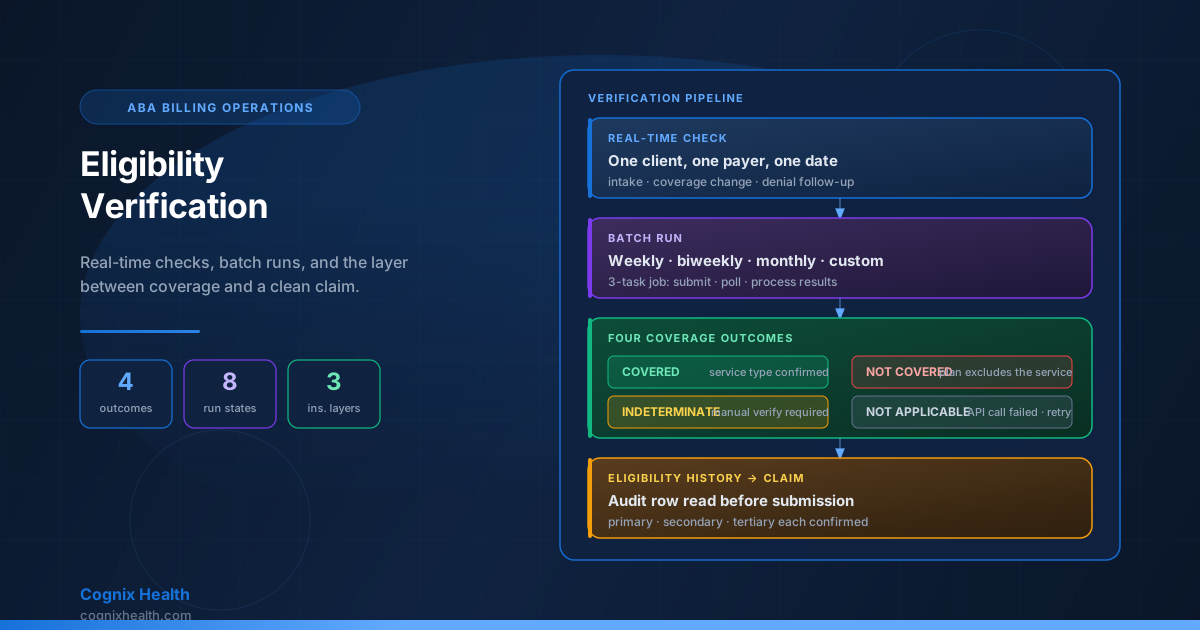
This guide walks through the full eligibility verification workflow used in Cognix Health. It explains the four coverage outcomes a real-time check can return, the eight states a batch run moves through, the four states an individual item in a batch can end in, the primary/secondary/tertiary coordination that handles multi-payer patients, the manual verification step that locks in an ambiguous result, the history and trend visibility that lets an operations lead see coverage drift across the caseload, and the operational practices that keep the verification queue from becoming a denial factory.
Complementary reading: Insurance Authorizations, Service Types, and the Billable Units Chain in ABA explains the upstream authorization chain that eligibility verification confirms against. The ABA Claim Lifecycle: Statuses, ERA, and What Every Payer Response Actually Means explains what happens to a claim when the eligibility record was wrong at submission time. Session Reconciliation and Billable Readiness in ABA Practice Management explains how the eligibility record has to agree with the session before the claim can be created.
Why Eligibility Verification Is Its Own Layer
An insurance authorization is a reservation. A claim is a request for payment. Eligibility verification is the confirmation that the reservation has a payer behind it on the day the visit happened. The three belong together but they are not the same thing. An authorization can be in force for a service the payer never intended to cover. A claim can be built correctly and submitted to the right payer and still be denied because the policy was not active on the date of service. The verification is the layer that confirms the payer agrees the visit was covered — and writes that confirmation down in a way the biller, the auditor, and the payer can all read.
The verification has two operating modes that solve different problems. A real-time check is a one-off confirmation, typically run before scheduling a complex visit, at intake, or after a payer reports a coverage change. A batch run is an automated sweep across the caseload, scheduled on a weekly, biweekly, or monthly cadence, that confirms coverage across many clients in one pass. Real-time is precise but slow. Batch is broad but asynchronous. Most practices need both: a batch to keep the bulk of the caseload verified, and a real-time check to handle the edge cases the batch cannot cover.
The verification also has three insurance layers to coordinate. A patient with primary, secondary, and tertiary coverage produces three independent eligibility checks against three different payers. Each payer has its own response, its own coverage outcome, and its own audit row. The verification workflow treats the three as parallel — never assume secondary is active because primary is, and never assume tertiary exists because secondary is — and writes each response to its own record so the claim later knows which payer is responsible for which portion of the bill.
The Eligibility Layer at a Glance
These counts describe the production eligibility verification workflow in Cognix Health as of September 2026. They are concrete and verifiable in code, not aspirational numbers about how an ABA operation should behave.
Real-Time Eligibility Checks
A real-time check is a single confirmation of one client's coverage against one payer at one point in time. The check is triggered by a user action — a billing specialist confirming coverage before booking a complex visit, a front-desk intake step after a new client is added, or an operations lead chasing a coverage question raised by a denial. The check returns immediately, writes a record to the eligibility history, and surfaces the result for the user who triggered it.
The check takes three inputs: the client membership identifier, the organization identifier, and the insurance layer to verify. The insurance layer can be one of three values (primary, secondary, tertiary) or the special value "all," which runs three parallel checks against all configured insurance records. Each layer produces its own audit row and its own result. A check against "all" is three independent checks wrapped in one user action — never assume secondary is active because primary is.
The check returns two pieces of information per insurance layer. The first is the API interaction status, which records whether the payer responded successfully. The second is the coverage status, which records what the payer said about coverage for the service type the practice is asking about. The two statuses are independent: a successful API call can return a not-covered result, and an API call that fails outright leaves the coverage status undetermined. Treating the two as separate is what makes the audit trail honest.
The Four Coverage Outcomes
Every real-time check ends in one of four coverage states. The state is recorded alongside the API interaction status, and the two together tell the user exactly what the payer said and whether the system believes it.
Covered. The payer returned a successful response and confirmed that the requested service type is covered under the plan. The response includes the in-network and out-of-network cost share — coinsurance percentage, copay amount, deductible — and the eligibility begin date the payer recorded. A covered result is the green light: the visit is billable to this payer for this date of service, and the claim can be built against this insurance layer.
Not Covered. The payer returned a successful response and confirmed that the requested service type is not covered under the plan. The response may include other plan details that are useful for the front desk (deductible information, general coverage notes), but for the specific service type the practice is asking about, the answer is no. A not-covered result is the red light: the visit cannot be billed to this payer for this service, and the biller has to either reroute to a different insurance layer, request a different service type, or notify the family that the visit will be self-pay.
Indeterminate. The payer returned a successful response but the coverage outcome is ambiguous. The response carries plan information that does not clearly answer the service-type question — for example, a generic "active coverage" without a service-type-specific benefit, or a benefit list that the system cannot parse against the requested service. An indeterminate result is the yellow light: the payer has not said no, but the system cannot confirm yes. The operations lead has to make a manual verification decision before the claim can be built.
Not Applicable. The API call itself failed — a network error, a payer-side outage, a credentialing rejection, or a timeout. No coverage outcome can be determined because no usable response was received. A not-applicable result is the gray light: the system tried to ask, the payer did not answer, and the verification has to be retried or escalated. The not-applicable state is the most common reason a real-time check has to be repeated.
What the Response Carries
A successful response from the payer carries more than the four-state verdict. The response includes the in-network and out-of-network cost-share breakdown (coinsurance percentage, copay amount, deductible), the benefit date range that confirms when the coverage window opens, the plan coverage name and the plan status code, the rendering provider name and identifier the payer has on file, and a set of benefit information blocks keyed by service type code. The codes the system pays most attention to are the mental-health and behavioral-health codes that ABA visits fall under, but the response carries benefit information across the full plan — primary care, pharmacy, dental, vision — so the practice can see coverage breadth at a glance.
The benefit date range is the field the operations lead reads first. A coverage outcome of "covered" with a benefit begin date of January 1 and a plan begin date of January 1 is a coverage that is in force today. A coverage outcome of "covered" with a benefit begin date of January 1 and a plan begin date of January 1 next year is a coverage that the payer has on file but that does not match the date of service the practice is asking about. The dates are what distinguish a covered visit from a covered plan.
When to Use Real-Time
Real-time checks are precise but they are not free. Each check makes a live call to the payer, which means each check takes a few seconds, each check counts against the practice's rate limit with the clearinghouse, and each check writes an audit row. The places where a real-time check is the right tool are the places where a batch run cannot answer the question fast enough.
The most common use is at intake. A new client is added to the system with a primary insurance record on file. Before the first visit is scheduled, the front desk runs a real-time check against the primary payer to confirm the policy is active and that the requested service type is covered. The check produces the eligibility history row that the scheduler will read when the first appointment is booked.
The second most common use is after a coverage change. The family reports a new policy, a new employer, a new Medicaid plan, or a termination of an existing policy. The operations lead runs a real-time check against the new insurance record to confirm the payer has the family on file before any further scheduling or billing is done against the new payer.
The third most common use is after a denial. The payer returns a denial with a reason that references coverage. The operations lead opens the eligibility history for the client, finds the record that the claim was built against, and runs a fresh real-time check to see whether the denial reflects a recent coverage change or an error in the original check. The fresh result is what the biller uses to decide whether to appeal, correct, or write off.
Batch Eligibility Runs
A batch run is an automated sweep across many clients in one pass. The run is scheduled by the operations lead, fires on a recurring cadence (weekly, biweekly, or monthly — with a custom option for organizations that need a non-standard schedule), and produces one eligibility record per client per insurance layer checked. The batch is the workflow that keeps the bulk of the caseload verified without requiring the front desk to remember to run individual checks.
The batch is configured per organization. The configuration captures whether the batch is enabled, what frequency it runs on, and which insurance layers to check (any combination of primary, secondary, tertiary). The configuration also captures the set of enrolled clients — the practice chooses which clients participate, and the batch processes only that enrolled set. A client is enrolled for batch eligibility by a deliberate action, not by automatic opt-in.
The batch fires automatically on the configured schedule through a scheduled background task. The task reads the configuration, identifies the clients to process, prepares one eligibility check item per client per insurance layer, submits the batch to the clearinghouse, and returns control to the scheduler. The clearinghouse processes the batch asynchronously and the system polls for results until the batch is complete.
The Eight Batch Run States
Every batch run moves through eight states from creation to completion. The state is recorded against the run, not against the individual items in the run, so the operations lead can see the overall progress at a glance.
Pending. The run has been created — either by the scheduler firing on cadence or by an operations lead triggering a manual run — but has not yet been submitted to the clearinghouse. A pending run is a run that is queued for submission. Pending typically resolves into submitted within seconds.
Submitted. The run has been delivered to the clearinghouse and the clearinghouse has acknowledged receipt. The clearinghouse is now processing the items. A submitted run is a run that the clearinghouse owns.
In Progress. The clearinghouse is actively processing the items in the run. Some items may already be complete; others are still being worked. In progress is the working state.
Polling. The system is fetching results from the clearinghouse. The run is no longer being submitted; it is being read. Polling continues until every item has a result.
Processing Results. The system has all the results and is writing them to the eligibility history. Each result is parsed, the coverage outcome is determined, the audit row is created, and the individual item is marked with its outcome. Processing results is the transition from raw payer response to recorded history.
Completed. Every item in the run has been processed and recorded. The run is finished. A completed run is a clean run — every client has an eligibility record for the insurance layers that were checked.
Completed With Errors. The run finished but one or more items could not be processed. The error might be a payer-side rejection, a malformed response, or a partial clearinghouse failure. The completed-with-errors state is the gray light at the run level: the run did its work, but the operations lead has to follow up on the items that errored.
Failed. The run could not complete. The clearinghouse rejected the batch submission, the credentials failed authentication, or the system could not reach the clearinghouse at all. A failed run is a run that has to be retried manually. A failed run is rare and usually indicates a configuration or integration problem, not a coverage problem.
The Four Per-Item Outcomes
Each client in the batch produces one item per insurance layer checked. The item moves through its own outcome independently of the run, so a single batch can produce a mix of successes, errors, and skipped items. The four item outcomes are the same shape as the four coverage states but at the item level.
Pending. The item has been queued but the clearinghouse has not yet returned a result.
Success. The clearinghouse returned a response and the system wrote the eligibility record with a coverage outcome. The success state tells the operations lead that the item is recorded and the client has an eligibility history row for this insurance layer on this date.
Error. The clearinghouse returned a response that the system could not parse, or the system received an error from the clearinghouse that the eligibility workflow could not handle. The error is recorded against the item with the error message and the run continues. An errored item is what the operations lead sees in the clients-needing-attention list at the end of the run.
Skipped. The system could not even submit the item to the clearinghouse. The most common reason is that the client does not have an active insurance record for the requested insurance layer — for example, the configuration asks for secondary but the client only has primary on file. The item is marked skipped with a reason message and the run continues without it. Skipped items are the cleanest failure mode: the system recognized the situation and recorded it without attempting a wasteful API call.
The Three Frequencies and the Custom Option
The batch runs on one of three standard frequencies or on a custom schedule. The standard frequencies are weekly (every seven days), biweekly (every fourteen days), and monthly (every twenty-eight days). The custom option lets the practice configure an interval (one through four), a unit (week or month), and a day pattern (specific days of the week for weekly intervals, specific day of the month for monthly intervals). The custom option is the configuration tool for practices whose payer mix or operations calendar does not fit the standard cadences.
The frequency choice has direct operational consequences. A weekly batch catches coverage changes fast but uses more clearinghouse capacity and produces a longer history. A monthly batch uses less capacity but lets a coverage gap linger for up to thirty days before the system notices. Most practices that take commercial insurance primarily run weekly; practices with a heavy Medicaid mix often run biweekly or monthly because the clearinghouse rate limit is tighter and the coverage changes are less frequent.
The batch is configured once and runs forever until disabled. The operations lead can disable the batch, change the frequency, change the enrolled clients, or trigger a manual run without changing the schedule. A manual run does not replace the next scheduled run; it runs in addition, and produces its own run record alongside the scheduled runs.
The Three-Task Job Structure
The batch is implemented as three background tasks that run in sequence. The three tasks separate submission from polling from result-writing so the system can recover from any single step without re-running the whole batch.
The first task submits the batch to the clearinghouse. The task reads the enrolled clients, prepares one eligibility item per client per insurance layer, skips any client that does not have the requested insurance layer on file, and submits the prepared batch to the clearinghouse. The task records the clearinghouse batch identifier and transitions the run from pending to submitted.
The second task polls the clearinghouse for results. The task reads the run record, identifies the items that are still pending, and fetches results from the clearinghouse for each pending item. The polling continues until every item has either a result or a final error from the clearinghouse. The task transitions the run from polling to processing results when the last item has a final state.
The third task processes the results and writes them to the eligibility history. The task reads each completed item, determines the coverage outcome, builds the eligibility audit row, and writes the row to the eligibility history. The task also writes the success or error count and the skipped count back to the run record. The task transitions the run to completed or completed with errors when the last item has been recorded.
The three-task structure is what makes the batch resilient. If the second task fails partway through polling, the next run picks up the items that were still pending and resumes from there — no duplicate work, no lost results. If the third task fails after writing some results, the next run picks up the items that were still pending in the result-writing step and finishes the run. The clearinghouse never sees a duplicate submission because the run record carries the batch identifier across runs.
The Three-Insurance Layer Coordination
A patient with primary, secondary, and tertiary coverage produces three independent eligibility checks, one against each payer. The three are treated as parallel records: each payer has its own eligibility history, each payer has its own coverage outcome, each payer has its own audit trail. The verification workflow does not infer secondary coverage from primary coverage, does not infer tertiary coverage from secondary coverage, and does not assume any one layer is active because another is.
The practical implication is that a denial on the secondary claim is almost always a coverage problem the verification did not catch. The primary payer paid the claim, the biller raised a secondary claim assuming the secondary payer would pay the remaining balance, and the secondary payer denied the claim because the patient was not active on the secondary plan on the date of service. The denial is preventable if the secondary eligibility was verified before the secondary claim was raised — and the verification is the only reliable way to know.
The coordination matters at three points. The first is at intake, when the front desk confirms all configured insurance layers before the first visit is scheduled. The second is at batch time, when the batch checks every insurance layer the practice has configured for every enrolled client and records a separate outcome for each. The third is at claim time, when the biller reads the eligibility history and confirms that the payer the claim is being sent to is the payer that confirmed coverage for the date of service. Three separate confirmations, three separate records, three separate audit trails.
The skipped-item state is the operational signal the verification workflow depends on. A client with primary and secondary configured who returns a skipped result for secondary is a client whose secondary insurance is not on file. The skipped state tells the operations lead that the front desk has to follow up with the family to confirm the secondary payer record. A skipped state is not an error — it is the system correctly identifying that the request could not be processed.
Manual Verification and the Audit Trail
A real-time check or a batch run can return a result that the operations lead disagrees with. The most common reason is an indeterminate coverage outcome — the payer returned a response but the response was ambiguous, and the operations lead has additional context that resolves the ambiguity. The second most common reason is a payer error — the payer returned a denial that the operations lead knows is wrong because the family has documentation of active coverage. The manual verification step is the workflow that lets the operations lead lock in a result and record the reason.
The manual verification writes four fields to the eligibility history. The first is the confirmation flag, which records that the operations lead has manually confirmed the result. The second is the confirmation timestamp, which records when the confirmation was made. The third is the confirming user, which records who made the confirmation for audit purposes. The fourth is the confirmation comment, which is required and records the reason for the confirmation. The four fields together produce an audit row that explains why a manual override was made and who made it.
The comment field is required for a reason. The comment is what the auditor reads when the practice is asked to defend a coverage decision that the payer originally disputed. A confirmation without a comment is a confirmation without a defense. The comment has to explain what additional information the operations lead had, why the payer response was wrong or ambiguous, and what the verified coverage outcome is.
The manual verification is also the workflow that handles a known coverage gap. The operations lead runs a real-time check, sees that the payer returned a "not covered" result, and knows that the family just changed plans last week and the new payer record has not been created yet. The manual verification can record the known-good coverage against the future payer record so the claim can be built against the right payer when the new record is in place.
History, Trend Visibility, and the Eligibility Worklist
Every real-time check and every batch item writes a row to the eligibility history. The history is per client and per organization, and it is the source of truth for what the payer said about coverage and when. The history is searchable by client, by date range, by insurance layer, and by coverage outcome, and it is the record the biller reads before building a claim.
The trend visibility sits on top of the history. The operations lead can see a six-month window of eligibility check counts for the organization, broken down by month. A flat trend means the caseload is stable and the checks are routine. A spike in checks means either the caseload grew or a coverage event triggered a wave of manual re-verifications. A drop in checks means either the caseload shrank or the batch is misconfigured and is not firing on schedule.
The eligibility worklist is the per-run summary that tells the operations lead which clients need attention after a batch. The worklist carries the run identifier, the run status, the completed timestamp, the trigger type (scheduled or manual), the totals (total items, success count, error count, skipped count, not-covered count), and a list of the clients that need follow-up. The follow-up list is the operations lead's daily work: every client in the list is a client whose eligibility either errored, was skipped, or returned a not-covered result that has to be resolved before the next visit is scheduled.
The worklist is what makes the batch actionable. A batch that produces a clean run with no clients needing attention is a batch the operations lead can ignore. A batch that produces ten clients needing attention is a batch the operations lead works through. The worklist is the bridge between the asynchronous batch and the synchronous front-desk follow-up.
Best Practices for Keeping Verification Healthy
The verification workflow is reliable, but only when the practice runs it on a schedule that matches the payer mix and works the worklist that comes back. The practices that keep verification healthy are the ones that have built the rhythm into the operations calendar.
-
Run the batch weekly for commercial-heavy caseloads. A weekly batch catches coverage changes within seven days, which is fast enough that the practice rarely books a visit against an expired policy. A biweekly batch is acceptable for Medicaid-heavy caseloads where coverage changes less often and the clearinghouse rate limit is tighter.
-
Run a real-time check at every intake, before the first visit is scheduled. The intake check is the single most important real-time check the practice runs. It confirms that the insurance record on file matches what the payer has on file and that the service type is covered before any scheduling or billing work is done.
-
Work the eligibility worklist the same day the batch completes. A batch that returns a list of clients needing attention is a list that has to be worked the same day. Clients needing attention are clients whose coverage is unconfirmed for the next visit — leaving them on the list is leaving them at risk of a denial.
-
Configure the batch to check every insurance layer the practice has on file. A batch that only checks primary is a batch that misses every secondary denial. The configuration has to enumerate every insurance layer the family has reported, and the worklist has to surface skipped items so the front desk knows when a layer is missing.
-
Re-verify after every reported coverage change. A family reports a new policy, a new employer, or a new Medicaid plan — the operations lead runs a real-time check against the new payer record before any further scheduling or billing work is done. The new payer record is untrusted until the check confirms it.
-
Require a comment on every manual verification. A confirmation without a comment is a confirmation that cannot be defended in an audit. The comment is what tells the auditor why the operations lead overrode the payer response. Without the comment, the manual verification is a black box.
-
Separate the eligibility history from the claim history. The eligibility history records what the payer said about coverage. The claim history records what the payer paid. The two are linked but they are not the same view. Mixing them produces a denial analysis that confuses coverage with adjudication.
-
Audit the manual verifications monthly. The operations lead reviews the manual verifications once a month. A pattern of verifications that always confirm "covered" is a pattern of verifications that may be ignoring payer denials. The monthly audit is what keeps the manual workflow honest.
-
Use the custom schedule for non-standard cadences. A practice whose payer mix shifts seasonally — for example, a school-based program that sees more coverage changes in August — can use the custom schedule to run the batch weekly during the change window and monthly the rest of the year. The custom option is the configuration tool that fits a non-standard operations calendar.
-
Train the front desk on the four coverage outcomes. The front desk has to know the difference between covered, not covered, indeterminate, and not applicable so they can route the follow-up correctly. A covered result is a confirmation, a not-covered result is a re-routing, an indeterminate result is a manual verification, and a not-applicable result is a retry.
Common Mistakes and How to Avoid Them
Worked Example: Two Payers, a Batch Run, and a Family in Transition
The best way to see the workflow is to walk it. Below is a realistic scenario that touches every major layer of the eligibility verification system and shows how a practice with two payers, a weekly batch, and a family in transition keeps the caseload verified.
The setup. A six-year-old patient is on the caseload with two insurance layers: primary through a commercial HMO, secondary through a state Medicaid plan. The authorization for the quarter covers 240 units of 97153 and 96 units of 97155 across both payers. The practice runs a weekly batch that checks both insurance layers for every enrolled client. The batch fires on Sunday at 2 AM, processes roughly 200 clients in the caseload, and writes 400 eligibility records per run (two records per client, one per insurance layer).
Sunday night — the batch fires. The scheduled background task reads the configuration, identifies the 200 enrolled clients, prepares 400 eligibility items (200 clients × 2 insurance layers), and submits the batch to the clearinghouse. The run transitions from pending to submitted. The clearinghouse acknowledges receipt and the run transitions to in progress. The polling task fetches results every few minutes until all 400 items have a final state. The processing-results task writes the eligibility history rows and the run transitions to completed with no errors. The worklist surfaces zero clients needing attention. The week starts clean.
Tuesday — the family calls. The family reports that the primary commercial plan terminated at the end of last month and the patient is now on a different Medicaid plan for primary. Secondary Medicaid stays the same. The front desk creates a new primary insurance record on the client profile, sets the old primary to inactive, and flags the record for re-verification. The operations lead runs a real-time check against the new primary payer. The clearinghouse returns a successful response with a covered outcome for the requested service type and an eligibility begin date that matches the new policy start. The new primary is confirmed.
Wednesday — the batch fires again. The weekly batch processes the caseload as usual. For this patient, the batch produces two items: one against the new primary payer, one against the secondary Medicaid payer. The new primary item returns a covered outcome. The secondary item returns a covered outcome. Both items are recorded in the eligibility history. The run completes cleanly.
The audit trail. The eligibility history for this patient now shows: a primary check from last week's batch (old payer, covered), a primary check from Tuesday's real-time verification (new payer, covered), a secondary check from last week's batch (Medicaid, covered), and a secondary check from this week's batch (Medicaid, covered). The audit trail shows the coverage transition, the re-verification, and the steady secondary coverage. The biller reads the history and knows that the next claim can be built against the new primary payer for the date of service on or after the new policy start.
The lesson. The verification is a system, not a step. The real-time check handles the transition. The batch handles the steady state. The worklist handles the gaps. The manual verification handles the exceptions. The eligibility history ties them all together into a record the biller can trust when the claim is built and the auditor can defend when the claim is reviewed.
How Cognix Health Supports Eligibility Verification
Cognix Health treats eligibility verification as a first-class workflow, not a pre-billing step. The real-time check, the batch run, the three-task job structure, the three-insurance coordination, the manual verification, and the eligibility history all share the same view of the patient — from the moment the insurance record is created through the moment the claim is paid.
The workflow includes:
- A four-state coverage outcome model — every real-time check and every batch item ends in covered, not covered, indeterminate, or not applicable, so the operations lead sees exactly what the payer said and what the system believes
- An eight-state batch run lifecycle — every batch run moves through pending, submitted, in progress, polling, processing results, completed, completed with errors, or failed, so the operations lead sees exactly where the batch is and what is left to do
- A four-state per-item outcome model — every item in a batch ends in pending, success, error, or skipped, so the worklist surfaces only the items that need follow-up and skipped items are flagged for front-desk action
- Three standard batch frequencies plus a custom schedule — weekly, biweekly, and monthly for the standard cadences, plus a custom interval for practices whose payer mix or operations calendar does not fit the standard options
- Independent primary, secondary, and tertiary coordination — each insurance layer is checked independently and recorded separately, so no payer is assumed to be active because another is and every denial can be traced back to a specific eligibility record
- A three-task background job structure — submission, polling, and result-writing are separated so the system can recover from any single step without re-running the whole batch and the clearinghouse never sees a duplicate submission
- Manual verification with a required comment — every manual override records who confirmed, when, and why, so the audit trail is defensible when the practice has to explain a coverage decision the payer originally disputed
- Per-client and per-organization eligibility history — every check writes a permanent row that the biller reads before building a claim and the auditor reviews when a claim is appealed
- A six-month eligibility trend view — the operations lead sees the verification cadence over time, so a drop in checks or a spike in coverage events surfaces before it becomes a denial problem
- A clients-needing-attention worklist — the operations lead sees every client whose batch item errored, was skipped, or returned a not-covered result, so the follow-up is a daily queue rather than a monthly scramble
The goal is to keep the verification honest. The operations lead sees the batch state, the worklist, and the trend. The front desk sees the intake check, the skipped items, and the family follow-up. The biller sees the eligibility history, the coverage outcome, and the date confirmation. The payer sees the claim. The family sees the result: a clean claim, a covered visit, and a treatment plan that continues without interruption.
Want to see how eligibility verification fits your practice workflow? Contact Cognix Health to schedule a demo.
Frequently Asked Questions
What is the difference between a real-time check and a batch run?
A real-time check is a single confirmation of one client's coverage against one payer at one point in time, triggered by a user action and returned immediately. A batch run is an automated sweep across many clients in one pass, scheduled on a recurring cadence and processed asynchronously by the clearinghouse. Real-time is precise but slow; batch is broad but asynchronous. Most practices use both.
Why are the four coverage outcomes not the same as the API interaction status?
The two are independent. The API interaction status records whether the payer responded successfully. The coverage outcome records what the payer said about coverage. A successful API call can return not-covered or indeterminate. A failed API call leaves the coverage outcome as not applicable. Treating the two as separate is what makes the audit trail honest about what the system knows.
What does a skipped item in a batch mean?
A skipped item is an item the system could not submit to the clearinghouse because the client does not have an active insurance record for the requested insurance layer. The most common reason is that the configuration asks for secondary but the client only has primary on file. Skipped items are not errors — they are the system correctly recognizing that the request could not be processed.
How often should the batch run?
A weekly batch is appropriate for commercial-heavy caseloads where coverage changes are frequent and the clearinghouse rate limit allows it. A biweekly or monthly batch is appropriate for Medicaid-heavy caseloads where coverage changes less often. The custom schedule is the right choice for practices whose payer mix shifts seasonally or whose operations calendar does not fit the standard cadences.
Can a batch run be triggered manually?
Yes. A manual run is triggered by the operations lead and produces its own run record alongside any scheduled runs. A manual run does not replace the next scheduled run; it runs in addition. The manual run is the right tool for chasing a coverage question raised by a denial or for verifying a new client cohort before the next scheduled batch.
What happens when a batch returns a "completed with errors" state?
The run finished but one or more items could not be processed. The error might be a payer-side rejection, a malformed response, or a partial clearinghouse failure. The worklist surfaces the errored items as clients needing attention, and the operations lead works through them to determine whether to retry, escalate, or follow up with the family.
Why is the comment required on a manual verification?
The comment is the defense. A manual verification is an override of the payer response, and the auditor reads the comment to understand why the override was made. A confirmation without a comment is a confirmation without a defense. The comment field is required so every manual decision is documented at the time it is made.
How does eligibility verification interact with the authorization chain?
The verification confirms the payer agrees the visit is covered for the date of service. The authorization confirms the payer has reserved units for the service. The two are independent: an authorization can be in force for a service the payer never intended to cover, and the verification can confirm coverage for a service the practice has not been authorized to perform. Both have to be true before a visit can be billed.
How does eligibility verification interact with the claim lifecycle?
The eligibility history is the record the claim is built against. A claim that is created against a covered eligibility record is a claim the payer has already confirmed coverage for. A claim that is created against an indeterminate or not-applicable record is a claim the payer has not confirmed coverage for — and that claim is at risk of a denial for coverage reasons. The biller reads the eligibility history before building the claim to confirm the coverage outcome.
What happens when a real-time check returns not applicable?
A not-applicable result means the API call failed — a network error, a payer-side outage, a credentialing rejection, or a timeout. No coverage outcome can be determined. The operations lead has to decide whether to retry the check, escalate to the clearinghouse, or fall back to a manual verification. A not-applicable result is the most common reason a real-time check has to be repeated.
Can a manual verification override a not-covered result?
Yes. A manual verification can lock in any coverage outcome the operations lead has evidence for, including covered when the payer returned not covered. The override is recorded with the required comment, the user identifier, and the timestamp, and the resulting eligibility record is what the claim is built against. The override is what handles the cases where the payer has a stale record and the family has documentation of active coverage.
What is the difference between a coverage outcome and a claim outcome?
A coverage outcome is what the payer said about coverage for the service type on the date of service. A claim outcome is what the payer decided about the claim after adjudication. The two can disagree: the payer can confirm coverage during verification and then deny the claim for medical necessity, timely filing, or a missing modifier. The eligibility history records the coverage outcome; the claim history records the adjudication outcome. Both views are kept separate.
This post was prepared by the Cognix Health team. The eligibility verification workflow, the four coverage outcomes, the eight batch run states, the three-task job structure, the manual verification step, and the eligibility history described here reflect the production behavior of the Cognix Health platform as of September 2026. For questions about how this workflow fits your practice, reach the team at [email protected].