
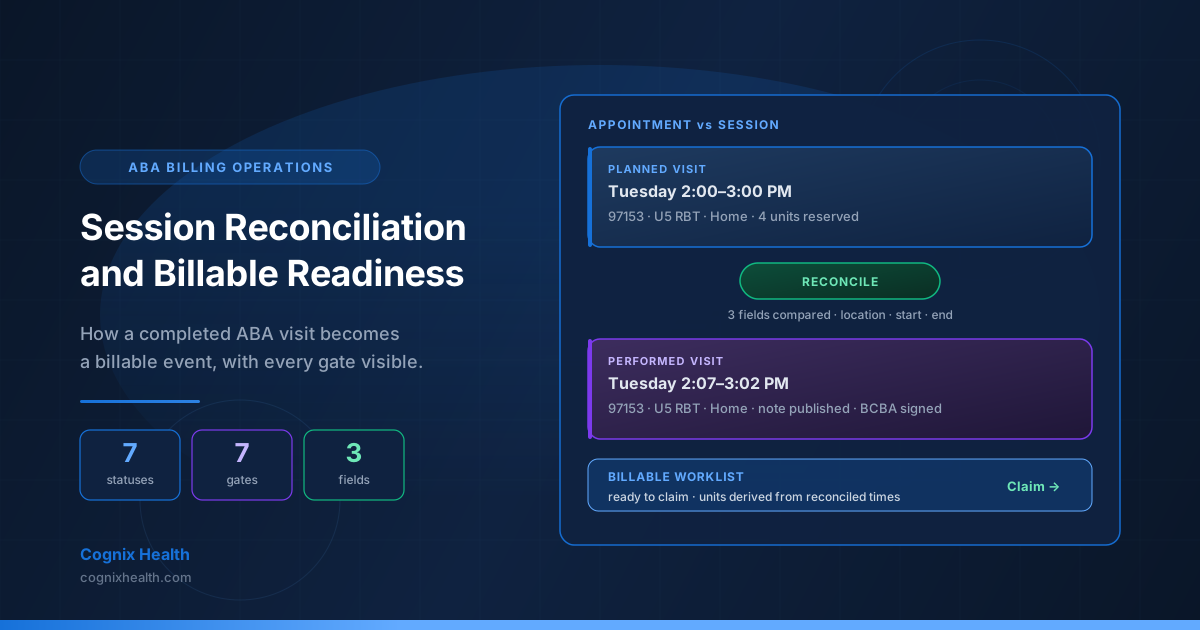
Every ABA practice eventually meets the same operational gap. The clinical team has finished the visit, the RBT has finished entering trial data, the BCBA has signed the note, the family has confirmed the time, and the biller opens the worklist only to find that some sessions cannot be turned into claims. The session exists. The data is complete. The note is signed. But the session was performed at a different time than the appointment, at a different location, or without a service type the payer recognizes — and until the biller reconciles the gap, no claim can be created. The visit is invisible to the revenue cycle.
The reconciliation problem is not a billing problem. It is a translation problem. The scheduling system records what was planned. The clinical system records what happened. When the two records diverge, the practice has to choose which one represents the billable event — and the choice determines whether the payer will pay, whether the auth units will balance, and whether the claim can clear the duplicate-visit guard at submission time.
This guide walks through the full reconciliation and billable-readiness workflow used in Cognix Health. It explains the seven appointment statuses that determine which visits can ever produce a claim, the seven session-completion gates that turn a scheduled visit into a populated clinical record, the trigger that fires when a session drifts from its appointment and flags it as needing reconciliation, the three fields the system compares (location, start time, end time), the two decisions a biller makes for time and location, the soft-delete layer that preserves a recoverable record when something goes wrong, and the operational practices that keep the queue of unreconciled sessions at zero as caseload grows.
Complementary reading: The ABA Claim Lifecycle: Statuses, ERA, and What Every Payer Response Actually Means explains what happens to a claim once it leaves the reconciliation queue. Insurance Authorizations, Service Types, and the Billable Units Chain in ABA describes the upstream authorization and service-type chain that the billable session has to trace back to. The Complete Guide to ABA Therapy Data Collection explains the structured trial data that lives behind every billable session.
What Reconciliation Is Actually For
Reconciliation is the discipline that turns what happened into what gets billed. The scheduling system records the planned visit: the start time, the end time, the location, the staff, the service type, and the units the authorization reserved. The clinical system records the actual visit: the start time the RBT actually opened the session, the end time the session actually ended, the location the visit was performed at, the staff who actually performed the work, and the trial data the session produced.
When the two records match, the visit is ready to bill. When they drift apart — even slightly — the session has to be reconciled before a claim can be raised. A visit that started ten minutes late consumes ten more units of authorization than the appointment booked. A visit that ended thirty minutes early consumes fewer. A visit performed at a clinic branch the appointment did not book may carry a different place of service and a different contracted rate. A visit performed by a different staff member may carry a different rendering provider. None of those differences is a billing error. All of them are reconciliation decisions the practice has to make.
The reconciliation is not a correction. It is a translation. The appointment says "we planned to do four units of 97153 at 2 PM with RBT A at the home location." The session says "we actually did six units of 97153 at 2:10 PM with RBT A at the home location." The biller has to decide whether to bill the planned four or the actual six, whether to keep the planned 2 PM or the actual 2:10 PM, and whether the unit difference is a billable event or a clinical anomaly. The reconciliation decision is what makes the claim auditable.
The discipline matters because the payer will only pay for what the authorization covers, what the documentation supports, and what the claim accurately represents. A claim built from an unreconciled session carries the risk of a denied service line, a returned claim for units outside the auth window, or a payment that the practice has to refund when the rendering provider does not match. The reconciliation is the layer that prevents each of those outcomes.
The Reconciliation Workflow at a Glance
These counts describe the production reconciliation and billable-readiness workflow in Cognix Health as of August 2026. They are concrete and verifiable in code, not aspirational numbers about how an ABA operation should behave.
The Seven Appointment Statuses
Every appointment lives in one of seven statuses. The status determines whether the appointment can ever produce a billable session, what role it plays in the unit-accounting math, and whether it counts as an active calendar entry that the family can see.
Upcoming. The appointment is on the calendar but has not yet occurred. An Upcoming appointment is a planned visit — the family can see it, the staff can prepare for it, the scheduler can adjust it. An Upcoming appointment does not carry a session record yet, and it cannot be billed. When the visit occurs, the appointment transitions to Kept.
Kept. The visit happened. A Kept appointment is the pivot state for the entire revenue cycle. Only Kept appointments participate in unit accounting on edits — when the biller changes the start time, the service type, or the staff of a Kept appointment, the unit math runs against the actual performed visit, not against the planned visit. A Kept appointment is the only status that produces a billable session.
Canceled. The appointment was canceled with sufficient notice. A Canceled appointment does not produce a billable session. The reserved units on the authorization are returned to the available balance. A Canceled appointment stays on the calendar as a historical record but is excluded from the biller's worklist.
Late Cancel. The appointment was canceled with insufficient notice — typically inside the cancellation window the practice has defined. A Late Cancel appointment has ambiguous billing treatment depending on the payer: some payers allow the practice to bill a partial fee, some allow the full fee, some disallow any fee. The billable decision is policy-driven and may differ across clients. A Late Cancel appointment is excluded from the standard worklist and surfaces in a separate review queue.
No Show. The client did not attend the visit and did not cancel. A No Show appointment does not produce a billable session for the family in most payer contracts — the practice may or may not bill depending on the contract — but the appointment is preserved as a clinical record and as an attendance measurement. The unit reservation is returned to the available balance.
Rescheduled. The appointment was moved to a different time. A Rescheduled appointment is the same visit as the original — the family still gets one session of service, just at a different moment. A Rescheduled appointment that has been moved forward to a time that has already passed can carry a session record; a Rescheduled appointment moved to a future time behaves like an Upcoming appointment at the new time.
Time Off. The staff member is not available. A Time Off entry is not an appointment in the clinical sense — it is a calendar block that prevents the scheduler from booking the staff during that window. A Time Off entry is sourced separately from the clinical appointment list and is excluded from the billable worklist entirely.
Why Kept is the pivot. Only Kept appointments participate in the unit-accounting math when a biller edits the record. When the biller changes the time of a Kept appointment to match the actual session, the units recalculate against the new range. When the biller changes a Canceled appointment to Kept, the unit reservation is restored. Every other status is read-only for billing purposes — the biller cannot turn a No Show into a Kept, because the visit did not happen. The pivot is what keeps the unit math honest.
How the Status Interacts With Billing
The appointment status is the gate. A Kept appointment is the only one that produces a billable session. The other six statuses all release the unit reservation back to the authorization — the practice cannot double-book those units, and the biller cannot bill them. A session record can only attach to a Kept appointment. An Upcoming appointment that has not yet been transitioned to Kept has no session. A Canceled appointment has no session and never will.
This is why the appointment-status discipline matters. If the scheduler leaves an appointment as Upcoming after the visit occurred, the session never gets created and the billable worklist does not show the visit. If the scheduler marks the visit as Canceled when it actually happened, the units return to the authorization and the visit is lost. The status discipline is the first gate in the billable-readiness workflow — every downstream gate depends on it.
The Session-Completion Gates
Once an appointment is Kept, the visit has to clear a sequence of completion gates before it can be turned into a claim. The gates are not a single check — they are a layered discipline, and each gate exists to prevent a specific kind of billing failure.
The session exists. The first gate is the session record itself. A session is created when the visit is opened — either by the RBT at the start of the visit, by the scheduler when the appointment is marked Kept, or by an automated process. A session record is the link between the appointment and the clinical data. Without a session, the visit is invisible to the billable worklist. A session that exists but is empty (no trial data, no notes, no service type) is in Open state — the gate is still locked.
The session has a service type. The second gate is the service-type assignment. The session has to carry the CPT code and modifier that the visit was performed under. For most ABA visits, the service type is 97153 (RBT direct therapy), 97155 (BCBA protocol modification), 97156 (family guidance), or 97151 (assessment). The service type determines the auth line the visit draws against and the modifier set the payer expects. A session with no service type cannot be billed because there is no code to put on the claim line.
The session has trial data. The third gate is the trial data. The session has to record at least one goal target with at least one trial answer — a Met, Failed, or No attempt response against a target. A session with trial data is a session that the BCBA can read, the payer can defend, and the authorization can charge. A session with no trial data is a session that the BCBA cannot sign off on, the payer cannot verify, and the auth cannot charge.
The session has notes. The fourth gate is the session note. The note is the narrative the BCBA writes about the visit — what was worked on, what the client did, what the next steps are. The note is what the payer reads to confirm medical necessity. A session with no note is a session the BCBA has not yet approved.
The session note is published. The fifth gate is publication. A note is published when the BCBA approves the note for the record — the publish action transitions the session from Open (or from BCBA Pending Signature) to Completed. The publish action is the gate that tells the rest of the system that the clinical work is done and the billable work can begin. An unpublished note keeps the session in the clinical worklist and out of the billable worklist.
The BCBA has signed (when required). The sixth gate is the BCBA signature. Some service types require a BCBA signature before the note can be published — for example, a session performed by an RBT under BCBA supervision may require the supervising BCBA to sign the note before publication. Other service types — direct RBT work that does not require a BCBA in the room — may not require a BCBA signature at all. The system reads the service type and the supervision requirement to determine whether the BCBA signature is needed. A session that requires a BCBA signature but has not received one stays in Pending BCBA Signature status — the publish gate is still locked.
The session has not been claimed yet. The seventh gate is the claim-link check. A session that is already linked to an active claim is excluded from the billable worklist — it has already been turned into a claim and the biller is working the claim, not the session. A session that has been claimed and unlinked (because the biller voided the claim or corrected it) returns to the worklist once the unlink flag is cleared.
The seven gates as a discipline. A session has to clear every gate before it can become a claim. The biller sees only the gate that fails — the rest are silent until they need to fire. Together the gates form a layered defense against the most common billing failures: missing service types, unsigned notes, double-claimed sessions, and sessions that drift from the appointment after the visit.
What the Billable Worklist Shows
The billable worklist is the queue of sessions that have cleared every gate and are ready to be turned into claims. A session appears in the worklist when:
- The linked appointment is Kept
- The session is completed (the note is published)
- The BCBA has signed when required
- A service type is recorded
- The session is not yet linked to an active claim
- The session is not flagged for soft-delete recovery
The worklist is the biller's daily queue. The biller works the worklist in date order — the oldest completed session first, the most recent last — so claims are filed promptly and the aging of unbilled work does not grow. A worklist that grows is a worklist that has a process problem, not a productivity problem. The most common cause of a growing worklist is sessions that have cleared the clinical gates but are waiting on reconciliation.
The Reconciliation Trigger
The reconciliation workflow begins the moment a session is marked completed. The system compares three fields between the session and the linked appointment, and if any of them differ, the session is flagged as needing reconciliation. The flag is automatic. The resolution is human.
The three fields compared are:
Location. The session has to have been performed at the location recorded on the appointment. A session performed at a different clinic branch — or at a different home address, or at a different school — carries a different place-of-service code, a different contracted rate, and potentially a different authorization line. The biller has to decide which location governs the claim. A mismatch prevents the session from entering the billable worklist until reconciled.
Start time. The session start time has to match the appointment start time closely enough that the visit is recognizably the one that was booked. A session that started late — or that was extended because the previous appointment ran long — carries a different start time, a different end time, and a different unit count. The biller has to decide whether the actual session time or the planned appointment time governs the claim. A mismatch flags the session for reconciliation.
End time. The session end time has to line up with the appointment end time. The same logic as start time, but in reverse: a session that ended early consumed fewer units, a session that ended late consumed more. The biller has to decide whether to bill the planned duration or the actual duration. A mismatch flags the session for reconciliation.
Units are not a separate trigger. Once the biller chooses which times govern the claim, the unit count follows from those times. That unit count is what the claim layer and the authorization math use next — it is a consequence of the time decision, not a separate comparison that fires the flag.
The comparison is triggered automatically the moment a session transitions from incomplete to complete. The system marks the session as needing reconciliation, sets the reconciled flag to false, and surfaces it in a dedicated reconciliation queue. The biller opens each session, compares the three fields, and chooses — for time and for location independently — whether the appointment record or the session record is the source of truth.
Reconciliation is a translation, not a correction. The session is not "wrong" when it drifts from the appointment. The drift is the truth of what happened. The appointment is not "wrong" either — it was the plan. Reconciliation is the act of deciding which record governs the claim and recording that decision so the audit trail captures why.
The Two Reconciliation Decisions
When a biller opens a flagged session, the product asks two independent questions — not four free-form outcomes. Each question has two answers: use the appointment value, or use the session value.
Time: appointment or session. The biller chooses whether the claim uses the planned appointment start and end, or the performed session start and end. Choosing the session time is the common path when the drift is real (the visit actually started late or ran long). Choosing the appointment time is the right path when the drift is a clinical artifact — for example, the RBT started the timer late but the visit itself occurred on schedule. When the session times win, the appointment row is updated to match the performed visit, and the original schedule is preserved as a snapshot for the attendance report.
Location: appointment or session. Separately, the biller chooses whether the claim uses the planned appointment location or the performed session location. A location mismatch is not always a time mismatch — a visit can start on time at a different branch. Choosing the session location carries the place-of-service and contracted-rate implications of the actual site. Choosing the appointment location keeps the claim on the planned site when the clinical team performed the work in the booked place of service and the session location was recorded incorrectly.
Those two choices — which record wins for time, which wins for location — determine the values the claim carries. The product records each selection, marks the session reconciled, and moves the session into the billable worklist with the resulting unit count. The decision is auditable — who reconciled, when, and which source won for time and location are all part of the session record.
Sessions that are not billable at all are handled outside this modal: the biller voids or unlinks through the claim and soft-delete workflows rather than treating "void" as a fifth reconciliation outcome. Incomplete documentation goes back to the clinical team before reconciliation, not through a special split-difference path.
The Reconciliation Queue and the Billable Worklist
The reconciliation queue is the biller's daily check on the calendar. Sessions that have drifted from their appointments surface here, not in the billable worklist. The two queues are separate on purpose:
- The reconciliation queue holds sessions that are completed but need a human decision before they can be billed. The queue is the biller's first stop in the morning.
- The billable worklist holds sessions that have cleared every gate and are ready to be turned into claims with a single action. The queue is the biller's second stop.
The separation matters because the biller's actions differ. A session in the reconciliation queue requires the biller to open the record, compare the three trigger fields, and choose appointment vs session for time and location. A session in the billable worklist requires only a click. Putting both in the same queue would either slow the biller down (forcing a comparison on every clear session) or hide the reconciliation sessions (because the biller would click through them quickly to get to the billable work).
The reconciliation queue is also the leading indicator of operational drift. A growing reconciliation queue means sessions are drifting from appointments more often than expected — usually because the clinical team is starting sessions late, ending sessions early, or performing sessions at different locations than the schedule expected. The biller cannot fix the drift alone; the operations lead has to address the root cause. A reconciliation queue that holds the same number of sessions every day is a healthy queue. A reconciliation queue that holds twenty sessions on Monday and fifteen on Tuesday is a queue that is being worked.
The Soft-Delete Layer
Reconciliation is not the only safety net. The system also preserves a recoverable record of every deleted session and claim through a soft-delete layer that runs in the background.
When a session or claim is deleted — for any reason — the system captures the full record as a snapshot and stores it in a centralized archive. The archive is searchable: the biller or operations lead can find any archived record by date range, by client, or by the original record identifier. The archive is recoverable: a record can be restored from the archive back into the live system with all of its original data intact. The archive is retained: snapshots are preserved for 180 days before automatic purge.
The soft-delete layer matters for reconciliation in two ways.
First, it prevents accidental loss. A biller who deletes a session by mistake — for example, because they confused two similar records — can recover the deleted session from the archive. The recovery preserves the session data, the appointment link, and the audit trail. Without the soft-delete layer, the deleted session would be gone, the unit reservation would have to be manually restored, and the billable work would have to be redone.
Second, it preserves the audit trail. The archive record captures the session or claim exactly as it existed at the moment of deletion. The record carries the date, the user who deleted it, and the full row data. When a payer asks for documentation of a deleted claim — for example, when a payer is investigating a service that was billed and then voided — the archive record is the source of truth. The archive is the record that defends the practice.
The soft-delete layer is gated by foreign-key constraints: a session with an active claim cannot be deleted because the claim depends on the session. The practice has to handle the claim first (typically by voiding the claim or unlinking the session) before the session can be deleted. The constraint is what prevents a biller from deleting a session that is still billable.
How Reconciliation Connects to the Claim Lifecycle
The reconciliation workflow is the upstream end of the claim lifecycle. A session that has not been reconciled cannot become a claim. A claim that is created from an unreconciled session is at risk of a denial, a unit adjustment, or a refund request — because the claim carries values that do not match the session or the appointment.
The connection runs through three checks that the claim-creation layer performs against the session record:
- The session is reconciled. The claim layer refuses to create a claim from a session that is flagged as needing reconciliation. The biller has to complete the reconciliation first.
- The reconciled units match the auth reservation. The claim layer reads the reconciled unit count from the session and confirms that the authorization has enough remaining units to cover the claim. If the reconciled units exceed the available auth, the claim fails the unit check and the biller is told to either reduce the units, request an additional authorization, or release the session back to the reconciliation queue.
- The session has not been claimed. The claim layer refuses to create a claim from a session that is already linked to an active claim. The biller has to either unlink the existing claim (and create a new one with the corrected values) or work the existing claim.
These three checks are the bridge between reconciliation and the claim lifecycle. The reconciliation queue produces the billable worklist, and the claim-creation layer reads from the billable worklist. A practice that keeps the reconciliation queue at zero produces claims faster, denials less often, and write-offs less frequently than a practice that lets the reconciliation queue grow.
Best Practices for Keeping the Workflow Healthy
The reconciliation workflow is reliable, but only when the biller works the queue daily and the operations lead monitors the drift. The practices that keep the workflow healthy are the ones the most efficient billing operations have built over years of trial and error.
-
Work the reconciliation queue before the billable worklist. Every morning, the biller opens the reconciliation queue first. Sessions that need a human decision have to be resolved before the biller can work the billable worklist, because the billable worklist is downstream of the reconciliation. A biller who skips the reconciliation queue is a biller who lets unreconciled sessions accumulate.
-
Confirm the actual session values as the default. When a session drifts from the appointment, the most common outcome is to confirm the actual session values. The drift is usually small (a few minutes) and is rarely a clinical artifact. Confirming the session values keeps the audit trail honest and reduces the risk of a denial for a missing service.
-
Use the appointment values only when the drift is a clinical artifact. A session that started ten minutes late because the RBT clicked the timer late is still a session that occurred on time. The biller confirms the appointment values and documents the reason in the session notes. The clinical record preserves the actual times; the claim reflects the planned time.
-
Void sessions that are not billable. A session performed by a non-credentialed provider, a session with insufficient documentation, or a session outside the auth window should be voided, not ignored. An ignored session sits in the reconciliation queue and accumulates. A voided session is released back to the authorization and the billable worklist.
-
Monitor the reconciliation queue weekly. The operations lead reviews the reconciliation queue size every week. A queue that holds the same number of sessions every week is healthy. A queue that grows is a queue that has a process problem — the clinical team is starting sessions late, the scheduling team is changing appointments after the visit, or the biller is not working the queue daily.
-
Use the soft-delete archive for accidental deletions. When a biller deletes a session or claim by mistake, the recovery is a search and a restore from the archive. The biller should not panic, should not recreate the session by hand, and should not call the operations lead for a database restore. The archive is the recovery mechanism.
-
Audit the reconciliation decisions monthly. The operations lead reviews the reconciliation decisions once a month. A pattern of confirming the appointment values when the session values were clearly correct is a pattern of fraudulent billing. A pattern of confirming the session values without checking the audit trail is a pattern of careless billing. The monthly audit is what keeps the reconciliation discipline honest.
-
Train the clinical team on the appointment-time discipline. The root cause of most reconciliation drift is the clinical team. Sessions that start late, end early, or run in different locations are sessions that have to be reconciled. Training the clinical team to start sessions on time, end sessions on time, and update the schedule when a location changes is the cheapest way to reduce the reconciliation queue.
-
Document every reconciliation decision. The audit trail captures who reconciled the session, when, and what values were used. The documentation is what defends the practice when a payer asks why a session was billed at a different time than the appointment. The trail is the proof that the practice made a deliberate decision, not an error.
-
Reconcile the same day the session is completed. A session that is reconciled the same day it is completed is a session that does not accumulate. A session that waits a week for reconciliation is a session that has to be reopened, reviewed, and re-decided. The same-day discipline is what keeps the billable worklist current.
Common Mistakes and How to Avoid Them
Worked Example: A Visit That Drifts From the Appointment
The best way to see the workflow is to walk it. Below is a realistic scenario that touches every major gate in the billable-readiness workflow and shows how a drifting visit becomes a reconciled session, a billable worklist entry, and a claim.
The setup. A six-year-old patient with Commercial insurance has a recurring appointment for 4 units of 97153 with a U5 RBT modifier, scheduled at 2:00 PM to 3:00 PM at the home location, every Tuesday. The authorization has 240 units of 97153 reserved for the quarter, with 180 units remaining after ten prior visits.
The visit. On Tuesday at 2:07 PM, the RBT opens the session in the system and starts entering trial data. The RBT and the client work through three goals, and the session ends at 3:02 PM. The actual session ran from 2:07 PM to 3:02 PM at the home location, with the U5 RBT performing the work.
The drift. The session start time (2:07 PM) differs from the appointment start time (2:00 PM). The session end time (3:02 PM) differs from the appointment end time (3:00 PM). The location matches. The RBT matches. The reconciliation trigger fires the moment the BCBA publishes the note — the session is flagged as needing reconciliation.
The note and the signature. The BCBA reviews the trial data, writes the session note (medical necessity, progress notes, next-step recommendations), and publishes the note. The session transitions to Completed. The system reads the service type (97153 with a U5 RBT modifier), confirms that no BCBA signature is required for this service type, and the session enters the billable pipeline.
The reconciliation. The biller opens the session the next morning. The three trigger fields are checked: location matches (home on both records), start time differs by 7 minutes, end time differs by 2 minutes. The biller chooses session time and session location as the source of truth. Units are then derived from the chosen times — 2:07 PM to 3:02 PM is 55 minutes, which rounds to 4 units at 15 minutes each. The session is marked reconciled and enters the billable worklist with the correct times and unit count.
The claim. The biller creates the claim from the reconciled session. The claim carries the CPT code 97153, the U5 RBT modifier, 4 units, the actual date of service (Tuesday), the actual start and end times, the contracted rate, and the primary insurance record. The authorization is charged 4 units (down from 180 to 176). The claim is reviewed, submitted, and processed through the 835 ERA workflow.
The attendance report. The original appointment time (2:00 PM) is preserved in the appointment metadata as the scheduled time, and the actual session time (2:07 PM) is the performed time. The attendance report measures the 7-minute lateness against the original schedule and surfaces it in the operations dashboard. The clinical team sees the lateness pattern and adjusts the RBT's start-of-day workflow to reduce future drift.
How Cognix Health Supports Reconciliation and Billable Readiness
Cognix Health treats reconciliation as a first-class workflow, not a cleanup step. The reconciliation queue, the billable worklist, the soft-delete archive, and the claim-creation gates all share the same view of the session — from the moment the appointment is marked Kept through the moment the claim is created.
The workflow includes:
- A seven-status appointment state machine — every appointment lives in one of seven statuses, and only Kept appointments participate in the billable pipeline, so the biller sees only the visits that can produce revenue
- Seven session-completion gates — every session has to clear the session record, service type, trial data, notes, publication, BCBA signature, and claim-link checks before it enters the billable worklist, so the biller sees only sessions that are ready to claim
- Automatic reconciliation trigger — the moment a session is completed, the system compares location, start time, and end time against the appointment, and flags sessions that drift, so the biller cannot miss a session that needs reconciliation
- Two independent reconciliation decisions — for time and for location, the biller chooses appointment or session as the source of truth; units are derived from the chosen times, so the claim carries a deliberate, auditable selection rather than a free-form edit
- A separate reconciliation queue and billable worklist — the biller works the reconciliation queue first (sessions that need a human decision) and the billable worklist second (sessions that are ready to claim), so the two workflows do not interfere with each other
- A centralized soft-delete archive with 180-day retention — every deleted session or claim is preserved as a recoverable record, and the archive is searchable by date range, client, or record identifier, so accidental deletions do not destroy billable work
- Foreign-key protection on session deletion — a session with an active claim cannot be deleted, and a session that requires reconciliation cannot be claimed, so the biller cannot accidentally create a claim from a record that does not yet exist or that has not been validated
- Per-session reconciliation audit trail — every reconciliation decision records who reconciled the session, when, and what values were used, so the practice can reconstruct the billable journey for any session for payer audits or internal review
The goal is to keep the billable pipeline honest. The biller sees the reconciliation queue, the billable worklist, and the claim-creation workflow. The clinical team sees the appointment status, the session completion, and the note publication. The operations lead sees the queue sizes, the reconciliation patterns, and the attendance drift. The payer sees the claim. The family sees the result: a clean claim, a paid visit, and a treatment plan that continues without interruption.
Want to see how reconciliation fits your practice workflow? Contact Cognix Health to schedule a demo.
Frequently Asked Questions
What is the difference between the reconciliation queue and the billable worklist?
The reconciliation queue holds sessions that are completed but have drifted from the linked appointment and need a human decision before they can be billed. The billable worklist holds sessions that have cleared every completion gate (including reconciliation) and are ready to be turned into claims with a single action. The two queues are separate on purpose so the biller can focus on decisions in the morning and execution in the afternoon.
Why is Kept the only appointment status that produces a billable session?
Kept is the only status that represents a visit that actually happened. Canceled, Late Cancel, No Show, and Rescheduled appointments do not produce billable sessions because the visit either did not occur or was canceled with enough notice that the unit reservation is returned. Upcoming appointments have not yet occurred. Time Off entries are calendar blocks, not visits. Only Kept appointments are eligible for session creation.
What triggers the reconciliation flag?
The reconciliation trigger fires automatically when a session is marked completed. The system compares the session location, start time, and end time against the linked appointment. If any of those fields differ, the session is flagged as needing reconciliation. The flag is automatic; the resolution is human. A biller has to open each flagged session, compare the values, and confirm which record governs the claim.
What is the soft-delete archive?
The soft-delete archive is a centralized record of every deleted session and claim. The archive captures the full record as a snapshot at the moment of deletion, including the date, the user who deleted it, and the complete row data. The archive is searchable, recoverable, and retained for 180 days. The archive is the recovery mechanism for accidental deletions and the audit trail for voided or claims.
Can a session with an active claim be deleted?
No. A foreign-key constraint prevents a session with an active claim from being deleted. The practice has to handle the claim first (typically by voiding the claim or unlinking the session) before the session can be deleted. The constraint is what prevents a biller from deleting a session that is still billable and disrupting the audit trail.
What happens to the appointment when the session is reconciled?
When a biller confirms the actual session values during reconciliation, the appointment row is updated to reflect the performed visit. The planned start time and end time are overwritten with the actual times, and the original schedule is preserved in the appointment metadata as a snapshot for the attendance report. The first snapshot wins — once the original schedule is captured, subsequent reconciliations preserve the original rather than overwriting it.
How does reconciliation interact with the authorization chain?
Reconciliation interacts with the authorization chain at the unit-accounting step. When a session is reconciled, the unit math recalculates against the actual session time. If the reconciled units exceed the available authorization, the claim-creation layer refuses the session and the biller has to either reduce the units, request an additional authorization, or release the session. The reconciliation is the moment when the auth and the session have to agree.
What is the difference between a session in Pending BCBA Signature status and a session in Open status?
A session in Open status has been created but not yet completed — the trial data, the note, or the BCBA signature may still be pending. A session in Pending BCBA Signature status has been completed but requires a BCBA signature that has not yet been provided. The Pending BCBA Signature status is a more advanced state: the clinical work is done, but the payer will not accept the session until the BCBA signs. The biller cannot claim a session in either state.
What is the role of the original-schedule snapshot?
The original-schedule snapshot is the planned appointment time that is preserved in the appointment metadata when a session is reconciled. The snapshot is what the attendance report measures against — the operations team uses the difference between the planned and actual times to monitor lateness patterns across the clinical team. The snapshot is the first capture, and it persists across reconciliations so the attendance report does not drift.
How does the reconciliation workflow interact with the claim lifecycle?
The reconciliation workflow is the upstream end of the claim lifecycle. A session that has not been reconciled cannot become a claim. A session that is reconciled enters the billable worklist. A claim that is created from a reconciled session carries the correct times, the correct unit count, and the correct location. The claim then moves through the 12-state machine, the ERA workflow, and the patient ledger reconciliation — all of which assume the session was reconciled before the claim was created.
What happens when the soft-delete window expires?
Archived records are purged automatically 180 days after deletion. The purge removes the snapshot from the archive and frees the storage. The practice has 180 days to recover a deleted session or claim; after 180 days, the recovery is not possible through the archive. The 180-day window is configurable for organizations that need a longer retention period.
How does the billable pipeline handle a session that is completed but has no service type?
A session that is completed but has no service type cannot be billed because there is no CPT code to put on the claim line. The session stays out of the billable worklist until a service type is recorded. The biller returns the session to the clinical team for completion, and the clinical team records the service type and republishes the session. The billable pipeline is intentionally strict on this gate to prevent claim with missing service codes.
This post was prepared by the Cognix Health team. The reconciliation workflow, the billable-readiness gates, the appointment state machine, the soft-delete archive, and the claim-creation checks described here reflect the production behavior of the Cognix Health platform as of August 2026. For questions about how this workflow fits your practice, reach the team at [email protected].