
Every ABA claim ends up in one of three places. It gets paid. It gets denied. It gets stuck. The biller opens the file on Monday morning, sees 200 claims in the queue, and the same question repeats: which ones are waiting on the payer, which ones need correction, which ones are paid but not yet posted, and which ones are simply lost. The question is not whether the visit happened — the visit always happened. The question is whether the practice can recognize the revenue, recover it from the payer, or absorb the loss.
The difference between a healthy billing operation and a struggling one is rarely the submission. It is what happens after submission. A claim moves through a precise state machine from Draft through Voided, with each state triggering a different operational action. A payer response arrives as an Electronic Remittance Advice (ERA) — the 835 file — and the practice has to reconcile the money, the units, and the patient balance in a single workflow. The state machine, the ERA workflow, and the reconciliation layer are the three pieces that turn a submitted claim into posted revenue. Most practices see them as three separate problems. They are one problem.
This guide walks through the full claim lifecycle in Cognix Health. It explains the 12-state machine that every claim moves through from creation to closure, the 835 ERA workflow that delivers payer decisions, the primary/secondary/tertiary coordination that handles multi-payer patients, the audit trail that records every state change, the bulk reconciliation process that closes ERA responses against the ledger, and the operational practices that keep the lifecycle intact as claim volume grows.
Complementary reading: Insurance Authorizations and the Billable Units Chain in ABA explains the upstream authorization and service-type chain that produces a billable claim in the first place. The Complete Guide to ABA Therapy Data Collection describes the structured trial data that lives behind every claim line.
What the Claim Lifecycle Is Actually For
The claim lifecycle is the operational layer that turns performed sessions into recognized revenue. The session was completed. The data was collected. The note was signed. The authorization was charged. The visit is now a billable event — but the practice has no revenue until the claim moves through the state machine and the payer responds. The lifecycle is the discipline that connects the billable event to the bank deposit.
The lifecycle matters because the 837 professional claim that goes to the payer is not the end of the work. It is the beginning. The payer processes the claim, returns an acknowledgement, makes a decision, and sends an 835 ERA that describes exactly what was paid, what was adjusted, and what the patient now owes. The practice has to read the ERA, reconcile it against the claim, post the payment to the ledger, update the patient balance, and either close the claim or queue it for follow-up. Every one of those steps is a state in the lifecycle. Every state is a different operational action. The discipline that keeps the lifecycle honest is the discipline that keeps the practice solvent.
The Claim Lifecycle at a Glance
These counts describe the production claim lifecycle in Cognix Health as of August 2026. They are concrete and verifiable in code, not aspirational numbers about how an ABA billing operation should behave.
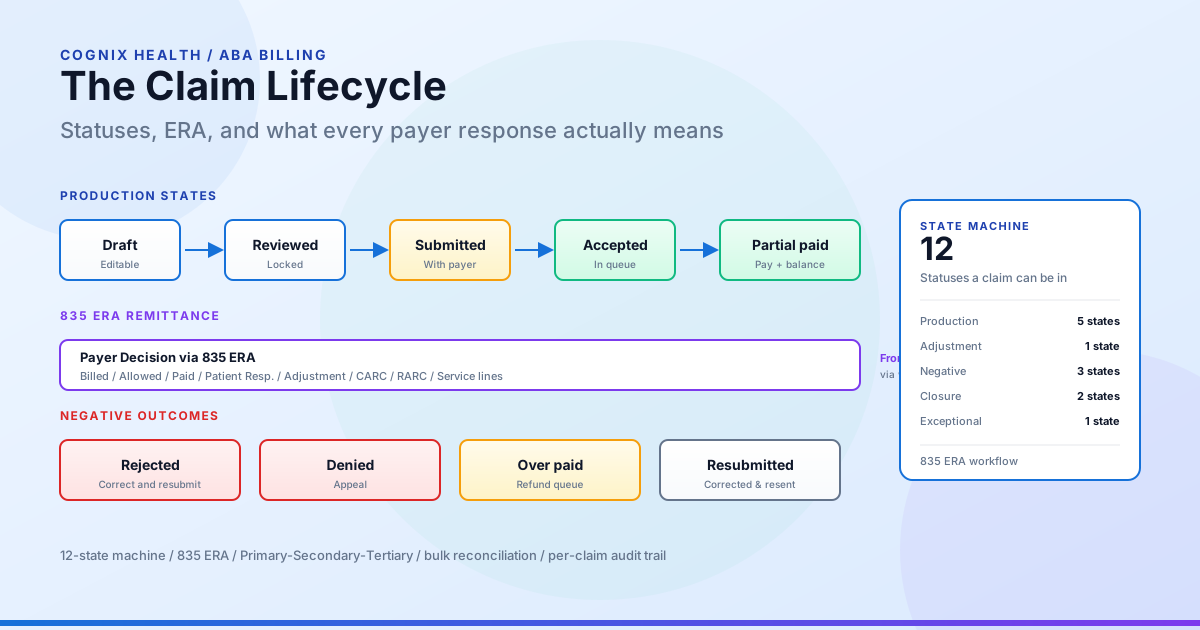
The 12-Status Claim State Machine
The claim moves through a precise state machine. Each state triggers a different operational action. The states form the lifecycle.
Why a state machine matters. Without a state machine, every claim is either "submitted" or "not submitted." With a state machine, every claim has a precise position, a precise next action, and a precise audit trail. The state machine is what lets a biller work 200 claims in a queue without losing one.
The Four Pre-Adjudication States
The first four states cover the practice-side path and the payer’s intake confirmation — before a money decision lands.
Draft. The claim is created in Draft when the biller is ready to bill a session. All claim details are editable: the rendering provider, the modifiers, the units, the date of service, the diagnosis codes, the place of service, and the billed amounts. The claim is owned by the biller assigned to it and is not yet ready for payer submission.
Reviewed. The claim has been reviewed internally by authorized staff — typically a billing lead or a practice owner — and locked for submission. The lock prevents accidental edits after the clinical review has cleared the claim. The claim is now ready for transmission. The biller takes Reviewed claims and submits them in batches to the clearing house.
Submitted. The claim has been transmitted to the payer through the 837 professional claim transaction. The claim is no longer in the practice’s hands. It is in the payer’s intake queue. The clearing house acknowledgement has been received, and the payer reference (the trace number, the claim control number, or the payer-assigned identifier) has been recorded against the claim. The state is now waiting on the payer’s first response.
Accepted. The payer has received the claim, validated the basic structural requirements (member ID, provider NPI, service code, date format, rendering provider on file), and entered it into the processing queue. Acceptance is not payment. Acceptance is the payer’s confirmation that the claim is well-formed enough to be adjudicated. The biller still has to wait for the final determination.
The Two Payment States
Once the payer adjudicates, the claim lands in one of two payment states — both of which still require follow-up until the remaining balance is resolved.
Partial paid. The payer has adjudicated the claim and paid a portion of the billed amount. The remaining balance is the patient’s responsibility, the secondary payer’s responsibility, or a contractual write-off (depending on the payer contract and the adjustment reason codes in the ERA). The claim stays in Partial paid until the remaining balance is resolved — through secondary submission, patient billing, or write-off.
Over paid. The payer paid more than the billed amount. Over payments happen with retroactive rate adjustments, with duplicate ERA processing, or with payers that apply contract escalators that the practice has not yet recorded. The Over paid state triggers a refund workflow — the practice owes the payer the difference and has to issue a refund check or a virtual card credit.
The Three Negative Outcomes
These three states are the paths that require correction, appeal, or a second submission.
Rejected. The payer rejected the claim without adjudicating it. Rejection happens before the claim reaches the adjudication queue. Common rejection reasons include missing member ID, missing modifier, invalid CPT/date combination, or provider credentialing issues. A rejected claim can be corrected and resubmitted as a new claim — the original claim stays in the Rejected state, and the new claim is created as a fresh claim number.
Denied. The payer adjudicated the claim and determined that the service is not payable. Denial reasons include medical necessity not established, authorization not on file, service not covered under the plan, or timely filing limit missed. A denied claim can be appealed — the practice submits additional documentation and asks the payer to reverse the denial. If the appeal succeeds, the claim moves to Accepted or Partial paid. If the appeal fails, the claim closes in the Denied state.
Resubmitted. A previously rejected claim has been corrected and sent back to the payer. The Resubmitted state is the trace that records the second submission. The state lets the practice distinguish the original submission from the correction — important for tracking how many rejections are second-pass corrections and how many are first-pass failures.
The Two Closure States
Voided. The claim has been cancelled and will not be processed. Voiding a claim is permanent. The claim cannot be reactivated. A new claim must be created if the visit still needs to be billed. Voiding is used when a claim was created in error, when the service was performed by a non-credentialed provider, or when the visit is being billed under a different claim number.
Closed. The claim has reached its terminal state. Closed claims have either been paid, denied, voided, or resolved through write-off. The claim is no longer actionable. The state is the final resting place for any claim that does not need further attention. The Closed flag is independent of the underlying status — it is the biller’s signal that the work is done.
The One Exceptional State
Error. The claim is in a state that the system cannot process. Errors happen when the 837 transmission fails, when the clearing house returns a malformed acknowledgement, when the ERA file is corrupted, or when an internal data integrity check fires. Error claims are visible to the biller in a separate queue. They are not in the normal workflow until the error is resolved — typically by re-submitting the claim or by manually fixing the data integrity issue.
Operational tip. Treat the state machine as the queue. A claim in Submitted is a claim waiting on the payer. A claim in Partial paid is a claim waiting on the secondary submission or patient balance. A claim in Rejected is a claim waiting on correction. The state tells the biller exactly what action is next, and the queue is the worklist.
The 835 ERA Workflow
The 835 Electronic Remittance Advice is the payer’s response to a batch of submitted claims. It is the second half of the claim lifecycle — the half that delivers the money decision.
What the ERA Carries
The ERA file carries one record per adjudicated claim, with the following information per claim:
- Claim control number — the identifier the payer assigned when the claim was accepted, used to match the ERA back to the original claim
- Claim status code — the payer’s determination (paid in full, partial payment, denied)
- Billed amount — the amount the practice submitted
- Allowed amount — the amount the payer considers payable under the contract
- Paid amount — the amount the payer is sending (typically allowed minus patient responsibility)
- Patient responsibility — the amount the patient owes (copay, coinsurance, deductible)
- Adjustment amount — the amount written off under the contract
- Adjustment reason codes — the CARC codes that explain why each adjustment was applied
- Remark codes — the supplemental RARC codes that explain the denial or adjustment in plain language
- Service line details — the per-line adjudication, including line-level allowed, paid, and adjustment amounts
How the ERA Reaches the Practice
The ERA arrives through the clearing house, not directly from the payer. The flow is: payer → clearing house → practice. The clearing house delivers the ERA to Cognix Health through a configured integration, and the system reads each claim record, matches it back to the original claim using the payer’s claim identifier, and applies the payer’s adjudication to the claim status.
How the ERA Updates the Claim Status
The ERA can drive a claim through several status transitions in a single workflow:
- Submitted → Accepted when the payer acknowledges the claim as well-formed and enters adjudication
- Submitted → Rejected when the payer rejects the claim for a structural reason (member ID not on file, NPI not credentialed)
- Submitted → Denied when the payer adjudicates and denies the service
- Accepted → Partial paid when the payer pays a portion of the billed amount
- Accepted → (terminal payment state) when the payer pays in full
- Partial paid → (resolution state) when the remaining balance is resolved through secondary submission or patient billing
- Any state → Over paid when the payer’s payment exceeds the billed amount
The status update is the trigger for the next operational action. A claim that lands in Partial paid triggers the secondary submission workflow. A claim that lands in Rejected triggers the correction queue. A claim that lands in Over paid triggers the refund workflow.
Why the ERA Matters More Than the 837
The 837 (the submission) tells the payer what the practice billed. The 835 (the ERA) tells the practice what the payer decided. The 835 is the document of record for revenue recognition. Every dollar of paid revenue, every dollar of contractual write-off, every dollar of patient responsibility, and every dollar of denied service is captured in the ERA. The practice that reconciles the ERA correctly recognizes revenue correctly. The practice that does not reconcile the ERA either overstates revenue (recognizing expected payments that the payer never made) or understates revenue (missing payments that the payer did make).
The Audit Trail the Lifecycle Leaves Behind
Every state change in the claim lifecycle is auditable. The audit is not a single record — it is a pattern that runs through the claim and surfaces the who, when, and what of every change.
A claim record carries the user who created it and the user who last updated it. A state transition records the user who initiated the transition, the timestamp of the transition, and the previous state. A bulk operation records the user who triggered the bulk action, the set of claim IDs included, and the result of the operation per claim. An ERA reconciliation records the source ERA file, the timestamp of the reconciliation, and the user who triggered the bulk update.
The audit trail is what the practice relies on when a payer asks for documentation of a denied claim, when an accountant asks for the reconciliation between billed revenue and collected revenue, or when an internal auditor asks why a claim was voided. The trail is the layer that lets the practice defend every dollar of revenue.
Common Failure Modes and How to Avoid Them
The claim lifecycle is reliable, but only when the state machine is treated as the source of truth. The most common failure modes are familiar to every biller who has worked a denied-claim day.
1. The Claim That Lands in Rejected for a Missing Modifier
The practice submits a claim for 97153 with a U5 RBT modifier, but the modifier is missing on the claim line. The payer rejects the claim, the biller corrects the modifier, and the corrected claim is resubmitted. The original claim stays in Rejected; the new claim moves through Draft → Reviewed → Submitted → Accepted. The fix is to validate the modifier against the service type and the authorized modifier set before the claim is submitted, not after the rejection arrives.
2. The Claim That Stays in Submitted for 30 Days
The practice submits a claim, the clearing house acknowledges the transmission, but the payer never returns an ERA. The claim sits in Submitted indefinitely. The fix is to monitor the ageing of the Submitted queue and to follow up with the clearing house or the payer when a claim ages past the expected adjudication window (typically 14–21 days for commercial payers, 30 days for Medicaid).
3. The Partial Paid Claim That Never Resolves
The claim lands in Partial paid after the ERA. The secondary payer is billed, but the secondary ERA never arrives. The claim sits in Partial paid indefinitely. The fix is to monitor the ageing of the Partial paid queue and to follow up on the secondary submission when it ages past the expected window. The Partial paid state is not a terminal state — it is a working state that has to move to a resolution.
4. The Claim That Lands in Over paid and Is Not Refunded
The payer pays more than the billed amount. The Over paid status is set, but the refund workflow is not triggered. The practice owes the payer money and does not know it. The fix is to surface Over paid claims in a dedicated refund queue and to process the refund within the payer’s required window (typically 30–60 days).
5. The Voided Claim That Should Have Been Denied
The practice voids a claim that was actually payable. Voiding is permanent. The visit has been performed, the data has been collected, the payer would have paid — but the claim is gone. The fix is to distinguish between void (cancel because the claim should never have been submitted) and denial (the payer decided not to pay). Voiding should be reserved for true billing errors, not for claims that the payer denied.
6. The Error State That Is Never Triaged
The claim lands in Error because the 837 transmission failed. The error is not surfaced to the biller in a separate queue. The claim sits in Error indefinitely and is never resubmitted. The fix is to surface Error claims in a dedicated error queue and to triage the queue daily.
7. The Bulk Update That Overwrites a Single-Claim Correction
The biller makes a single-claim correction to a Partial paid claim. The bulk ERA update runs against the same claim set and overwrites the correction with the bulk value. The fix is to scope bulk updates to the claims that are still in flight (Submitted, Accepted) and to exclude claims that have been individually corrected.
8. The Claim That Closes Without a Patient Balance
The claim is paid in full by the payer. The patient responsibility is zero. The claim is closed, but the patient ledger still shows a balance. The fix is to post the ERA response to both the claim and the patient ledger in a single transaction, so the patient balance is cleared at the moment the claim closes.
9. The Secondary Claim That Submits Before the Primary ERA Arrives
The practice submits a secondary claim before the primary payer has adjudicated the primary claim. The secondary payer rejects the secondary claim because there is no primary EOB to coordinate against. The fix is to hold the secondary submission until the primary claim reaches a terminal state (paid, denied, or voided) and to attach the primary EOB to the secondary submission.
10. The Claim That Is Paid Twice
The practice submits the claim, the payer pays, the practice resubmits the corrected version (not realizing the original was already paid), and the payer pays again. The double payment triggers an Over paid state on the second claim. The fix is to enforce the duplicate-claim check at submission time — the system refuses to create a new claim when an active claim for the same client, same date of service, and same CPT code already exists.
The Pre-Submission Validation Layer
Submission is the moment the practice commits to the payer. Every claim that reaches the clearing house has to be the cleanest version of itself — a missing modifier, a wrong rendering provider, a stale insurance record, or a missing session can each be the difference between a paid visit and a denied claim. The discipline is in what happens before the biller clicks Submit.
A claim that gets to Submitted has cleared a layered set of checks. None of these checks live in the biller’s head. They live in the system, and they fire in sequence — every layer has to pass before the next one opens. The biller sees the result (a clean Reviewed claim, ready to send) and not the machinery. The machinery is what makes the difference between a 95% first-pass yield and a 70% first-pass yield.
Why a validation layer matters. A denied claim costs the practice four dollars for every dollar it would have cost to prevent. The validation layer is the cheapest dollar in the operation.
The sections below describe the kinds of checks that run — at a high level, in plain language. They are not an exhaustive list. Behind each layer there are dozens of smaller rules the system enforces automatically. Together they form a safety net that catches the small things before they become denied claims, write-offs, or compliance issues. The biller should never have to think about them; the biller should know they exist.
Checks That Run When a Claim Is Built (Draft)
The first set of checks runs the moment a claim is created, before the biller ever opens it. The claim is built by reading the session, the appointment, the authorization, the insurance record, and the client-staff mapping, and assembling them into the billable record. Each of the following has to resolve cleanly or the claim lands in Error rather than Draft. Some examples of what the system checks for:
- Required fields are present. The appointment, the session, the start and end times, the rendering provider — every one of these has to be on file. If anything is missing, the claim lands in Error and the biller sees a specific reason, not a generic failure.
- The session is closed. A claim cannot be built for a session that is still open. If the visit is still being edited, the data is still being collected, or the note has not been signed, the claim waits. The wait protects the practice from billing a visit that has not happened.
- The clinical signature is on the note. For most ABA CPT codes, the payer requires a BCBA signature on the underlying note before the visit can be billed. The claim refuses to enter Draft until the signature is present.
- The rendering provider resolves. If the visit was performed by an RBT but the claim should be rendered under the supervising BCBA, the system resolves the right provider rather than billing under the wrong one.
- The insurance record matches the date of service. A patient’s insurance can change mid-year. The claim uses the coverage that was active on the date the visit happened, not the coverage that is active today, so a mid-year change does not misroute the claim.
- The contracted rate is the rate that was in force on the date of service. Rate contracts change. The claim uses the rate that was effective on the service date, not the rate that is current today, so a mid-year contract change does not retroactively rewrite a past visit’s billed amount.
- The charges calculate to non-negative amounts. If the units, the list rate, and the contracted rate together produce a negative billed amount, the claim refuses to enter Draft. Negative charges are an internal error, not a billable event.
This is a sample of the build-time checks, not the full list. Other checks run on top of these — including diagnosis-code completeness, place-of-service alignment, modifier-set consistency, and several internal consistency rules. Together they ensure the billable record is consistent with the visit before the biller ever opens it.
Checks That Run When a Claim Is Approved (Draft → Reviewed)
The second set of checks runs when the biller moves the claim from Draft to Reviewed. Reviewed is the gate before submission, and the gate enforces a small number of high-level rules — among them:
- The claim belongs to this organization. The system refuses to approve a claim that was created under a different organization identifier, which catches the cross-tenant error before it reaches the clearing house.
- No other visit on the same day is missing a documented service type. If the client had two visits on the same day and the second visit has no service type recorded against it, the claim refuses to approve. The biller is told to review the day’s appointments and add the missing service type before the approval can continue.
- A grouped claim is not duplicated. If two or more same-day visits share a CPT code and the same set of modifiers, the system checks whether a grouped claim already exists for any of them. If one does, the biller is asked to update the existing grouped claim, not create a duplicate. The grouped-claim check is the gate against the duplicate-payment failure mode.
These are the three approval gates that surface most often. Several smaller rules run beneath them — including payer-id consistency, billing-entity alignment, and a handful of internal cross-record checks. The biller sees only the gate that fails; the rest are silent until they need to fire.
Checks That Run When a Claim Is Submitted (Reviewed → Submitted)
The third gate runs at the moment of submission. The claim has to be in Reviewed status — not Draft, not Submitted, not anything else — and the clearing house has to accept the transmission. If the clearing house returns an error, the claim does not advance. It stays in Reviewed with the clearing-house error visible to the biller, who can correct and resubmit.
The submission only flips the status when the clearing house accepts the transmission. A claim in Submitted without a clearing-house acknowledgement is a claim that never made it to the payer, and the system prevents that state.
Behind this gate there are additional checks the biller does not see — transmission-format validation, payer-id resolution, clearing-house routing rules, and acknowledgement matching. They run inside the transmission and only surface when something goes wrong.
Checks That Run Before a Secondary (or Tertiary) Claim Can Be Raised
A secondary claim is the biller’s request to the next payer after the primary payer has adjudicated the visit. Raising a secondary too early is the most common cause of secondary rejections, and the system has a small number of high-level gates that have to pass before a secondary can be raised at all:
- The parent claim has to be a Primary. A secondary can only be raised from a primary claim. The system refuses to raise a secondary from a claim that is itself a secondary or a tertiary.
- The primary claim has to have a remittance to coordinate against. The secondary can only go out once the primary payer has adjudicated and returned a remittance. If the primary has not responded — or its only response has been superseded — the secondary waits, because there is nothing valid to coordinate against yet.
- The next payer has to exist on file. The system checks that secondary (or tertiary) coverage was active on the date of service before a follow-on claim is raised, so the practice does not send a claim to a payer that will only reject it.
A secondary claim is explicitly linked to its parent primary claim. The link is what lets the secondary payer trace the coordination, what lets the biller see the full claim family in one view, and what lets the reconciliation layer post the secondary ERA against the original visit.
Other secondary-raise checks run beneath these — including payment-amount comparisons between the primary ERA and the secondary contracted charges, service-type matching across the cascade, and several payer-specific routing rules. They exist so that the secondary claim is meaningful before it leaves the practice.
Why These Layers Matter
The validation layer is not a single check. It is a sequence. A claim that passes the Draft checks still has to pass the Reviewed checks. A claim that passes the Reviewed checks still has to clear the clearing house. A claim that clears the clearing house still has to wait for the ERA before a secondary can be raised against it. Every layer exists because payers deny claims for predictable reasons, and every layer is an opportunity to catch the denial before the visit becomes a write-off.
The list above is a representative sample. The full set of checks is larger — there are dozens more rules running in the background, each guarding against a specific denial reason the field has seen in practice. Together they form a layered discipline that protects revenue, protects the family, and protects the biller from chasing preventable denials.
The biller sees the result, not the chain. The chain is what makes the result reliable.
Best Practices for Keeping the Lifecycle Intact
The lifecycle is not a single record. It is a pattern that requires discipline to maintain. The practices that keep the lifecycle intact are the ones the most efficient billing operations have built over years of trial and error.
-
Treat the state machine as the queue. Every claim has a state. The state tells the biller what action is next. Organize the worklist by state, not by date. The biller works the Rejected queue first, the Partial paid queue second, the Submitted queue third, and the Draft queue fourth.
-
Review claims in Reviewed state daily. A claim in Reviewed state is a claim ready for submission. The review should confirm the rendering provider, the modifiers, the units, the diagnosis codes, the place of service, and the billed amounts. A daily review prevents the Reviewed queue from growing into a backlog.
-
Submit claims in batches, not one at a time. Batch submission through the clearing house is faster, cheaper, and easier to audit than individual submission. The batch should group claims by payer so the ERA response can be matched back to the batch.
-
Monitor the Submitted queue weekly. Claims in Submitted state are waiting on the payer. The ageing of the Submitted queue is the leading indicator of payer-side problems. A claim that has been in Submitted for more than 21 days (commercial) or 30 days (Medicaid) needs follow-up.
-
Reconcile the ERA within 48 hours of receipt. The ERA delivers the payer’s decision. The reconciliation posts the decision to the claim and the patient ledger. A 48-hour reconciliation window prevents the ERA backlog from growing and keeps the patient balance accurate.
-
Resolve Partial paid claims weekly. A claim in Partial paid has a remaining balance that is either the patient’s responsibility, the secondary payer’s responsibility, or a contractual write-off. The weekly resolution cycle should close every Partial paid claim within seven days of the ERA.
-
Triage Error claims daily. Error claims are not in the normal workflow. They are in a separate queue that requires human triage. The daily triage should re-submit the claim, fix the data integrity issue, or void the claim with documentation.
-
Audit Over paid claims weekly. An Over paid claim is money the practice owes the payer. The weekly audit should identify the refund amount, the refund method (check, virtual card credit, or ACH reversal), and the payer’s refund window.
-
Run the bulk ERA reconciliation on its own schedule. The bulk reconciliation should not run at the same time as single-claim corrections — the bulk pass should be scheduled and scoped to claims that are still in flight. Single-claim corrections made by a biller should be preserved through the bulk pass.
-
Close claims only when the work is done. A claim is closed when the payment is posted, the patient balance is resolved, and no further action is required. Closing a claim prematurely hides it from the worklist and makes it harder to identify the claims that still need attention.
Common Mistakes and How to Avoid Them
Worked Example: One Claim, Two Payers, Every Major State
The best way to see the lifecycle is to walk it. Below is a realistic scenario that touches every major state in the state machine and shows how the data flows from claim creation to claim closure.
The setup. A six-year-old patient with Commercial insurance (primary) and Medicaid (secondary) receives 4 units of 97153 with a U5 RBT modifier on May 1. The session is completed, the data is collected, the note is signed, and the authorization is charged. The biller is ready to bill. The claim is created in Draft. The claim carries the CPT code, the modifier, the units, the date of service, the rendering provider, the contracted rate, the billed amount, and the primary insurance record.
The review. The biller reviews the claim on May 2. The rendering provider is confirmed, the modifier matches the service type, the units match the session, the date of service matches the appointment, and the billed amount matches the contracted rate. The biller transitions the claim to Reviewed. The claim is locked for editing.
The submission. The biller submits a batch of Reviewed claims to the Commercial payer through the clearing house. The 837 transmission is acknowledged. The claim transitions to Submitted. The claim control number is recorded against the claim.
The first ERA. On May 8, the clearing house delivers the 835 ERA. The ERA shows the claim was accepted and paid in full at the contracted rate. The allowed amount equals the billed amount. The paid amount equals the allowed amount. The patient responsibility is zero. The system updates the claim to Accepted. The payment is posted to the ledger. The patient balance remains zero. The claim is closed.
The second claim. The biller then submits a secondary claim to Medicaid for the same visit. Because the primary claim was paid in full, there is no patient balance and no contractual write-off — the secondary claim should be $0. The biller creates the secondary claim, reviews it, and submits it to Medicaid with the primary EOB attached. The secondary payer adjudicates the claim as $0 (no patient responsibility after the primary payment). The claim transitions to Accepted, the payment is posted as $0, and the claim is closed.
The rejected claim. In a parallel scenario, a separate claim for the same patient is submitted to the Commercial payer with a missing modifier. The clearing house acknowledges the transmission. The payer rejects the claim. The ERA shows the rejection reason as "missing modifier." The claim transitions from Submitted to Rejected. The biller corrects the modifier, creates a new claim (not a resubmission of the rejected one — a new claim with the corrected data), reviews it, and submits it. The corrected claim moves through Submitted to Accepted. The original rejected claim stays in Rejected for audit purposes.
The denied claim. In another parallel scenario, a separate claim for 97156 family guidance is submitted to Medicaid. The payer denies the claim with the reason "service not covered under the plan." The claim transitions from Submitted to Denied. The biller files an appeal with documentation of medical necessity. The appeal succeeds. The payer reprocesses the claim and pays it in full. The claim transitions from Denied to Accepted. The payment is posted. The claim is closed.
The error claim. In a final scenario, a claim for 97153 is submitted but the 837 transmission fails because of a malformed NPI. The clearing house returns an error. The claim transitions to Error. The biller triages the error, fixes the NPI, and resubmits the claim. The corrected claim moves through Submitted to Accepted.
How Cognix Health Supports the Claim Lifecycle
Cognix Health treats the claim lifecycle as a single connected workflow, not a sequence of disconnected screens. The state machine, the ERA reconciliation, the patient ledger, and the audit trail all share the same view of the claim — from the moment the biller opens Draft through the moment the claim closes.
The workflow includes:
- A complete state machine — every claim moves through the same twelve statuses with the same transitions, so the biller, the auditor, and the operations lead are always looking at the same numbers
- ERA reconciliation tied to the claim and the ledger — when the payer returns a remittance, the system updates the claim status and posts the payment to the patient ledger in a single workflow, so balances stay accurate the day the ERA arrives
- Primary, Secondary, and Tertiary coordination — claims carry their payer position, and the secondary submission waits for the primary adjudication before going out, so secondary rejections for missing primary EOBs stop happening
- Dedicated worklists for the exceptional states — Error claims, Over paid claims, and stuck-Submitted claims surface in their own queues, so they get daily attention instead of vanishing into the main list
- Duplicate-claim guardrails — the system refuses to create a second active claim for the same client, date, and service code, so double-paid visits stop reaching the refund queue
- Per-claim history — every state change records who made it, when, and from which prior state, so the practice can reconstruct any claim’s journey for payer audits or internal review
The goal is to keep the lifecycle honest. The biller sees the state machine. The auditor sees the audit trail. The payer sees the claim and the ERA. The family sees the result: a clean claim, a paid visit, and a treatment plan that continues without interruption.
Want to see how the claim lifecycle fits your billing workflow? Contact Cognix Health to schedule a demo.
Frequently Asked Questions
What is the difference between Rejected and Denied?
Rejected means the payer refused to adjudicate the claim — typically for a structural reason (missing data, invalid code, credentialing issue) that can be corrected and resubmitted. Denied means the payer adjudicated the claim and determined that the service is not payable — typically for a clinical or coverage reason (medical necessity, prior auth not on file, service excluded from the plan) that requires an appeal. A rejected claim can usually be corrected and resubmitted as a new claim. A denied claim can be appealed, and the appeal may reverse the denial, but the original denial stands until the appeal succeeds.
Why does a claim stay in Submitted if it has been acknowledged?
Submitted means the claim has been transmitted and acknowledged by the clearing house, but the payer has not yet returned a decision. The state moves to Accepted, Rejected, or Denied when the payer’s adjudication arrives through the ERA. A claim that stays in Submitted for more than the expected adjudication window (typically 14–21 days for commercial payers, 30 days for Medicaid) needs follow-up with the clearing house or the payer.
What happens when the ERA shows partial payment?
The claim moves to Partial paid. The payment is posted to the ledger. The remaining balance is split between the patient responsibility (copay, coinsurance, deductible) and the contractual write-off (the difference between the billed amount and the allowed amount under the contract). The biller then submits a secondary claim if the patient has secondary coverage, bills the patient for the patient responsibility, or writes off the contractual difference.
What is the role of the adjustment reason codes?
The adjustment reason codes (CARC codes) are the payer’s explanation for why the billed amount was adjusted. A common example is CO-45 (charge exceeds fee schedule / maximum allowable), which tells the practice that the difference between the billed amount and the allowed amount is a contractual write-off. The remark codes (RARC) add context — for example, M127 (missing/incomplete/invalid service code) explains the specific correction needed. The codes are the audit trail that lets the practice reconcile the ERA against the contract.
Can a claim be reopened after it is closed?
No. Closing a claim is a terminal action. The Closed state means the work is done and the claim is no longer actionable. If a new event requires attention (a retro-rate adjustment, a corrected ERA from the payer, a patient balance dispute), the biller creates a new claim or a manual ledger adjustment — not a reopen of the closed claim. The audit trail on the closed claim is preserved for reference.
How does the system prevent duplicate claims?
The duplicate-claim check runs at claim creation time. The system refuses to create a new claim when an active claim (not in Voided or Closed) for the same client, the same date of service, and the same CPT code already exists. The check is the layer that prevents the duplicate-payment failure mode — a claim that was paid, resubmitted by mistake, and paid again.
What happens to the patient ledger when a claim is paid?
The payment is posted to the patient ledger in the same transaction that updates the claim status. A claim that pays in full clears the patient balance to zero. A claim that pays partially splits the remaining balance between the patient responsibility (which stays on the patient ledger) and the contractual write-off (which is recorded as a separate ledger entry). The split happens at the moment of payment, not after.
How does the lifecycle interact with the authorization chain?
The claim is the downstream end of the authorization chain. The authorization reserves the units at scheduling time. The session is performed. The data is collected. The note is signed. The authorization is charged at claim creation. The claim is then submitted to the payer, adjudicated, and paid. The lifecycle cannot produce revenue from a session that was not authorized — every claim traces back to an authorization record, and the audit trail records the link.
What is the difference between Voided and Closed?
Voided means the claim was cancelled and will not be processed — the biller decided the claim should not exist. Closed means the claim has reached its terminal state through the normal workflow — the payer adjudicated it, the payment was posted, and no further action is required. A voided claim is a billing error that has been corrected. A closed claim is a completed workflow that has been retired from the worklist.
How does the lifecycle interact with the AI-assisted documentation layer?
The AI documentation layer only sees sessions that have been performed and signed off. The AI layer writes the narrative, not the billing. The session has to be performed, the data has to be collected, and the note has to be signed before the claim can be created. The AI layer is upstream of the lifecycle — it produces the documentation that supports the claim, but the lifecycle is what turns the documentation into revenue. The two layers are independent by design.