
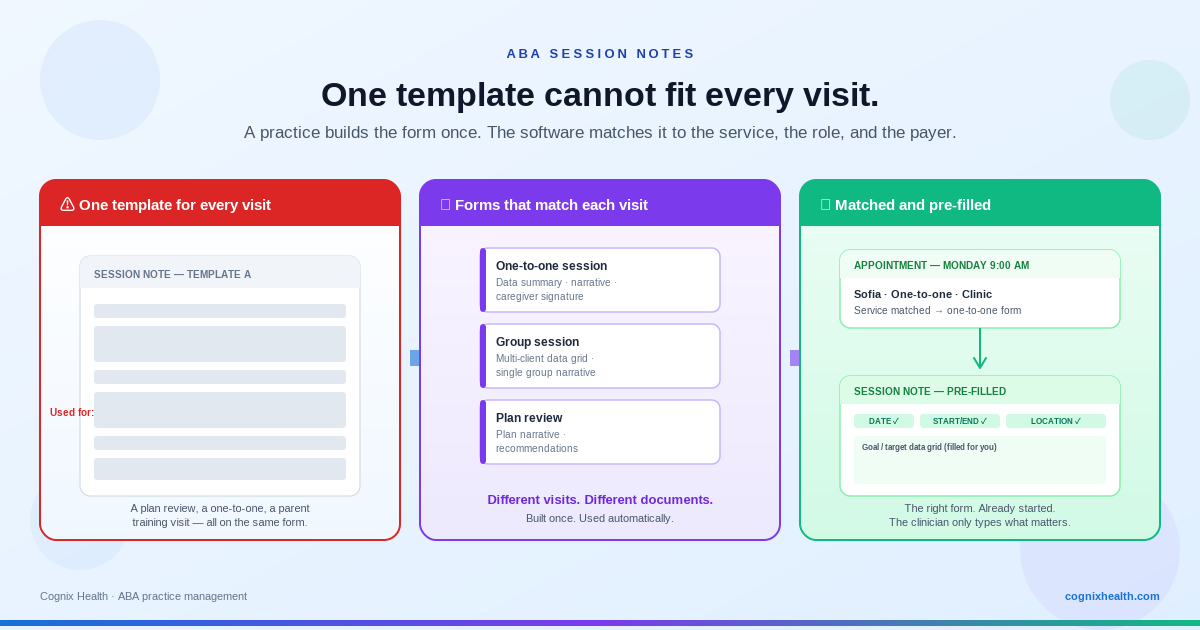
In plain language. Every ABA session ends with a note. That note has to satisfy the payer, the supervising BCBA, the school team, and the parent. A single template cannot do all four jobs well — a BCBA's plan review and an RBT's one-to-one session are not the same event. This post explains why one-size-fits-all session notes fail ABA practice, what good documentation software has to handle, and how Cognix Health lets the practice match the form to the visit.
What a Session Note Has to Do
Why One Template Is the Wrong Answer for ABA Session Notes
ABA is not a single kind of visit. A BCBA reviewing a treatment plan, an RBT running a one-to-one session with a client, a parent training visit, a group session with four clients, and a clinical consultation are five very different events. They are documented differently, paid by the payer under different rules, and audited by people who look for different things.
Most practices end up with a single template anyway — either the one that came with the software they bought, or a Word document the BCBA built once and never updated. The template gets used for every visit, and the clinician adapts: extra fields get left blank because they do not apply, important fields get typed into free-text because they are not in the template, and the BCBA spends Monday morning trying to read a session note that was never designed for the visit it describes.
The cost shows up in three places. The clinician spends more time on each note. Fields that do not apply still have to be acknowledged, and missing fields have to be worked around with free-text. The payer sees a note that does not match the service. A one-to-one template applied to a parent training visit looks like a documentation error, and the payer can deny on that basis alone. The audit trail is harder to defend. A note that was filled in on the wrong template is a note that has to be defended on someone else's terms.
What Good Session-Note Software Has to Do
A practice that takes documentation seriously eventually arrives at the same list. Good session-note software handles five jobs at once, and any missing one shows up in the next audit.
The right field set for the visit. The form a BCBA fills in for a plan review should not be the form an RBT fills in for a one-to-one session. Different services, different roles, different payer requirements — different documents.
The right match, every time. When the practice schedules an appointment, the system should know which form to use for that visit, without the clinician having to remember or pick.
Pre-filled basics. The date, start time, end time, and location should be filled in from the appointment. The clinician should never have to retype what the calendar already knows.
Signatures that are wired up. A signature field for the rendering provider should pull the right person, with the right consent, in the right place. A signature field for a parent should land on the caregiver's line, not the clinician's.
A history that does not shift. When the practice edits a form to improve it, last week's notes should not change. The clinician should be able to edit a form freely, knowing that every note already published is still the note that was published.
If any of these five is missing, the practice ends up doing the missing work by hand — and the missing work is always the work that falls on the BCBA's evening hours.
How Cognix Health Matches the Form to the Visit
Cognix Health treats the session note as something the practice builds once and reuses forever, with the software doing the matching so the clinician never has to think about it.
The practice builds its own forms. The form builder is a list of the kinds of fields a session note might need: a single line for a date, a longer area for a narrative, a single choice, a multi-choice, a checkbox, a toggle, a date picker, a date-and-time picker, a signature, a grid of rows for the goal-and-target data summary, and a static message for instructions and headings. The practice picks which fields appear, in what order, what each is called, and which ones the clinician must fill in before publishing. A new form starts with the basics already in place — date, start time, end time, location, the goal-and-target data grid, a text field, and a signature — so the practice only has to add the parts that match its payers.
Date, time, and location come from the appointment. A session note is always tied to the appointment that produced it. The date the clinician sees on the form is the date the appointment was scheduled for. The start time and end time come from the appointment. The location — clinic, home, school, telehealth — comes from the appointment too. The clinician never types these in.
The right form finds its way to the right visit. When an appointment is created, the system looks at the services on it and picks the form that matches those services. If the appointment is for a one-to-one session, the one-to-one form is selected. If the appointment is for a parent training visit, the parent training form is selected. If the appointment has no specific service — a plan review, a clinical consultation, a meeting — the system picks the form that fits the clinician's role. The matching is automatic. The clinician never has to remember which form to use.
Different documents for different kinds of work. A BCBA's plan review asks for the kind of reasoning that a one-to-one session does not: a treatment-plan narrative, a goal-progress summary, recommendations. An RBT's one-to-one session asks for the kind of observation that a plan review does not: a per-target data summary, a session narrative, a caregiver report. The two are different events. The two are different documents. The practice builds them once and the system uses the right one automatically.
Per-payer requirements stay where they belong. One payer wants the setting and instructional antecedent recorded. Another wants the client's response latency. The practice builds both into the forms the payer needs, and the clinician only fills in the fields that apply to the visit at hand. The required-field set is set deliberately, against the payer's requirements, rather than inheriting a default template's rules.
Signatures are wired up. When the practice builds a form with a signature field, the system knows whether that signature belongs to the clinician who ran the session or to a parent or caregiver. The rendering provider's signature is applied from the provider's stored signature rather than drawn fresh each time, with the signer's name and the date recorded. When a payer requires a rendering provider co-signature, the system wires that signature into the form automatically; a form without one stops a session from being created for clients on that payer. The clinician does not have to remember which form needs which signature.
Editing a form does not rewrite history. Every session stores its own copy of the form's fields as they stood when the session was created. When the practice improves a form, every past session keeps the original. A reviewer reading last week's note sees last week's document, not today's improved one.
A Practice's First Week With the Form Builder
To see how the pieces fit, follow a mid-sized practice through its first week using Cognix Health's form builder.
The practice builds five default session-note forms. The first is for RBT one-to-one work: the standard fields plus the data summary and a session narrative. The second is for group sessions: the standard fields plus a multi-row grid that holds one row per client in the group. The third is for BCBA plan reviews: the standard fields plus a treatment-plan narrative and a goal-progress summary. The fourth and fifth are role-based fallback forms — one for direct-service staff, one for BCBAs and clinical directors — that catch the appointments with no specific service attached.
On Monday, an RBT runs a one-to-one session. The form the practice built for one-to-one work appears automatically, pre-filled with the date, start time, end time, and location from the appointment. The RBT fills in the data summary, writes the session narrative, checks the caregiver-report box, and collects the caregiver's signature.
On Wednesday, a BCBA runs a group session with four clients. The group form appears, with the data grid already set up for one row per client. The BCBA fills in one row per client and one narrative covering the group. The session produces a single note covering the whole group.
On Thursday, a clinical director reviews a client's plan. The appointment has no specific service attached. The system finds no service-matching form, so it falls back to the role-based form for clinical directors. The clinical director fills in the plan-review narrative and signs.
The form the system picks is the one the practice built for that kind of work. The clinician never had to choose.
Best Practices
- Build a form for every service the practice actually schedules. A form that is not built cannot be matched, and an unmatched visit forces the clinician to use the wrong document.
- Keep the standard fields on every form, under their standard names. Date, start time, end time, and location are pulled from the appointment by name. Renaming one leaves the value blank on the exported note.
- Build the role-based fallback forms even when the practice rarely needs them. They are the safety net for plan reviews, consultations, and meetings — the visits that have no service attached.
- Set required fields against the payer's requirements, not by habit. A required field is a hard block on publishing, so set it deliberately.
- Edit the form freely. Past sessions keep their own copy of the form's fields, so improving a form does not change historical notes.
Common Mistakes
Frequently Asked Questions
Should a BCBA's plan review and an RBT's one-to-one session use the same form?
No. They are different events, and the documents should reflect that. A BCBA's plan review asks for plan-level reasoning an RBT's session does not. An RBT's session asks for the data summary a plan review does not. Two forms, built once, used automatically.
How does the system know which form to use?
It looks at the services on the appointment and picks the form that matches. If the appointment has no specific service, the system falls back to the form that fits the clinician's role. The clinician does not choose.
What happens to old session notes when the practice edits a form?
Nothing. Every session stores its own copy of the form's fields. Improving a form changes every future session; past sessions stay as they were when the visit happened.
Does the clinician have to remember the form for each visit?
No. The system picks the form when the appointment is created. The clinician opens the session and the right document is already there.
Cognix Health ships the form builder with the full field set, pre-filled standard fields from the appointment, automatic matching by service and by role, signature wiring for both clinician and caregiver signatures, and per-session snapshots that keep history intact. Forms are built once by the people who know the payers, and every visit afterward documents on the right document. Contact Cognix Health to see the form builder in your own practice.
This post was prepared by the Cognix Health team. The session-note form workflow described here — the field set, the matching by service and by role, the pre-filled standard fields, the signature wiring, and the per-session snapshots — reflects how Cognix Health matches the form to the visit. For questions about how this fits your practice, reach the team at [email protected].