
In plain language. Every ABA practice eventually meets the same bottleneck at the front door. A family is interested, the intake is in pieces, the practice cannot easily tell who is ready, and billing gets triggered before anyone meant it to. This post is about that gap. It explains what onboarding is supposed to do, what goes wrong when it is done by hand, what good onboarding software has to handle, and how Cognix Health keeps the family, the practice, and the billing system working in the right order.
What Good Onboarding Has to Do
The Front-Door Problem Every ABA Practice Hits
A parent hears a recommendation from the pediatrician. They call the practice, get a packet of forms in the mail or in a PDF, fill in what they can, and wait. Days pass. The BCBA opens the chart to find the intake arrived in an email thread, the insurance card is a photo on someone's phone, and the authorization number is missing. The first billable session gets pushed back a week — not because anyone did anything wrong, but because nothing in the process forces the right information to arrive at the right place at the right time.
That friction is universal in ABA. Most practices build the front door with whatever they have on hand: a website form, a stack of PDFs, an email inbox, a spreadsheet, and the front-desk staff's memory. Each piece works on its own. Together, they leave the family confused about what to send and where, and they leave the practice unsure which families are ready for a first session and which are still in pieces.
The cost of that friction is bigger than it looks. A family who gives up on a long registration never reaches the BCBA's intake queue. A half-onboarded family who is allowed to schedule a session before intake lands creates downstream rework the BCBA ends up paying for in their evening hours. And a practice that lets the same family move into a billable state before the practice is ready starts the clock on payer-side compliance work it was not prepared for.
Why Hand-Rolled Onboarding Breaks Down
The pattern is the same in almost every practice that does onboarding by hand. Four failure modes show up again and again.
The first contact is in one place, the intake is in another. The website collects interest. The PDFs arrive by email. The insurance card lives in someone's text messages. No one is forcing these to converge into a single picture the practice can act on.
The practice cannot tell who is ready. A long list of names in a spreadsheet does not say who has completed intake, who is still missing the address, and who has abandoned the process entirely. The front desk ends up reading emails to find out.
Billing gets a head start the practice cannot stop. The moment a chart opens, billing assumes the family is active. There is no flag that says "not yet," and no easy way to keep a half-onboarded family out of the claims queue.
Half-onboarded families can reach clinical features. A family who registers online can sometimes book a visit or open a clinical document before the practice has reviewed the intake — and the BCBA ends up rewriting the note after the fact.
These are not bugs in any one piece of the workflow. They are the result of building a front door out of separate parts that were never designed to be one process.
What Good ABA Onboarding Software Has to Do
A good onboarding workflow handles four jobs at once, and a single missing one breaks the rest.
A clear, low-friction entry point for the family. A form the family can fill in from a phone, in five minutes, with the right questions in the right order, that does not require an account to start.
A welcome that walks the family through what is left. A page the family lands on after signing in that says what they have done, what is still outstanding, and what to do next — without the family having to remember.
A staff view of every family in onboarding. A list that says which families are ready, which are stuck, and what each one is missing — so the front desk can do its job without reading emails.
A single decision point for activation. One action the practice takes that says "this family is billable now." The same action is what says "this family is not billable yet."
Billing that respects the practice's decision. Billing does not start until the practice says so, no matter how long intake took.
If any of these five is missing — the family is left guessing, the practice is left reading emails, or billing gets a head start — the front door leaks.
How Cognix Health Keeps Onboarding in Order
Cognix Health treats onboarding as a single workflow with a clear separation between "interested" and "active." The family does what they can on their side, the practice decides when they are ready, and billing waits for the practice to give the go-ahead.
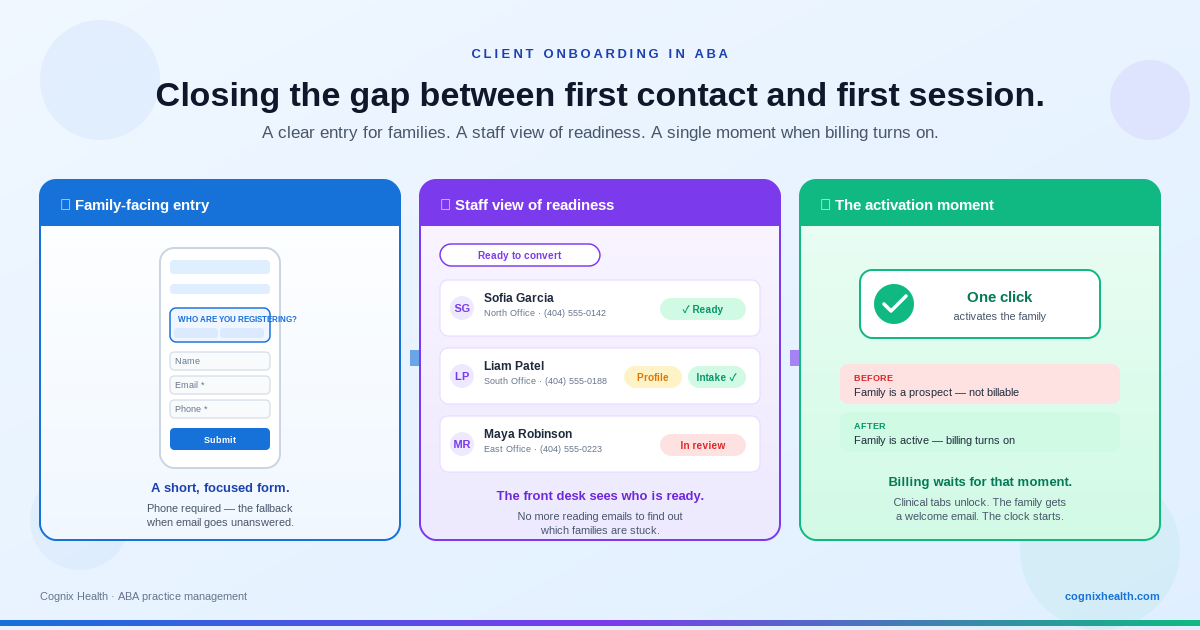
A public registration form that asks the right things. The family fills in a short, focused form from a link the practice shares from its website, intake email, or business listing. The form asks who is being registered, the name, an email, and a phone. Submitting the form does the rest: it sets the family up to sign in, notifies the practice by email, and lands the family on a welcome page that tells them what to do next. The phone is required because, in practice, it is the only reliable way to reach a family who did not respond to the welcome email.
A welcome page the family can come back to. When the family signs in for the first time, they land on a page that walks them through the two things they need to fill in: their profile, and the intake form. The page updates as each step is done, and a small status pill in the top navigation reminds the family where they are no matter where they have navigated on the site. The family does not need to remember what they have done or what is left.
A staff view that says who is ready. The practice opens a single list of every family in onboarding. Each row shows the family, the contact details, who is assigned to them, and a status that says whether the family is ready to be activated, or which step is still missing. A filter lets the front desk see only the families who are ready. The list works the same on a desktop or a tablet, and the front desk does not have to switch tools to act on a row.
Clinical features stay hidden until the family is ready. A family who is still filling out intake cannot schedule a session, cannot review a session note, cannot upload a document, and cannot see the clinical parts of the dashboard. The welcome page is the only page they see. This is not a setting the practice has to remember — the system enforces it from the moment of registration until the practice gives the go-ahead.
The single decision that activates the family. When the practice decides a family is ready, one click on the staff list turns the family into a billable client. The click does the whole job: it makes the family visible on the regular client list, opens up the scheduling and clinical tabs, sends a welcome email to the family, and — only then — lets the billing system count the family as active. The single decision is the single source of truth, and the practice can see who has been activated, when, and by whom.
Billing waits. Until that single click happens, the family is invisible to billing. No claim is generated. No charge is created. No invoice goes out. The billing system treats the family as a prospect until the practice says otherwise. This is what closes the gap that hand-rolled onboarding leaves open: the practice is in control of when the clock starts, and the clock does not start before.
A Family's First Week With Cognix Health
To see how the pieces fit, follow a family through their first week.
A parent named Maria opens a registration link her daughter's pediatrician shared. The form asks who is being registered, the name, an email, and a phone. Maria picks "My child or someone I care for," enters her daughter's name (Sofia), her own email, and her own phone, and submits. Within a minute, the practice receives an email saying Sofia has registered. Maria receives an email that lets her set a password.
Maria sets a password and lands on the welcome page. The page says "Step 1 — fill in your profile," and a hint reminds her that her daughter's address and date of birth will auto-fill into the intake form so she does not have to type them twice. Maria opens Profile, enters Sofia's date of birth and address, and saves. The welcome page updates: Step 1 is done, Step 2 is now active, and the status pill in the top bar now reads "Account setup · 1 of 2."
Two days later, Maria opens the intake form. Sofia's address and date of birth are already filled in. Maria adds the medical and developmental history and saves. The welcome page updates: Step 2 is done, the page now says the practice is reviewing, and the status pill switches to "Account in review."
The next morning, the front desk opens the staff onboarding list. Sofia's row shows both steps complete and a "ready" badge. The front desk clicks one button to activate Sofia. The family appears on the regular client list, the clinical tabs are now visible to Sofia and her care team, the welcome page is replaced with the regular client dashboard, and Sofia receives a welcome email.
Every step in that flow — the family's sign-in, the welcome page, the staff list, the activation, the welcome email — happens because the system keeps the family in a "not billable yet" state until the practice says otherwise.
Best Practices for Practices
A few habits keep onboarding running smoothly regardless of the software underneath.
- Keep the family-facing form short. Five fields is better than fifteen. A long form is the most common reason a family gives up before intake.
- Make the phone required. Email alone is a weak channel. A phone gives the front desk a way to reach the family when the welcome email goes unanswered.
- Reply to a new registration the same day. A family who registers and hears nothing for a week is much less likely to complete intake than a family who gets a call within four hours.
- Run the "ready" list once a day. A practice that treats the activation queue as a daily worklist does not let families sit in onboarding more than 24 hours after they finish.
- Use the optional review step only when there is a real two-eyes need. Most practices do not need an internal review between intake and activation. The review step exists for organizations with separate admissions or compliance teams.
- Never activate a family by hand. Going around the activation step — manually opening a chart, manually creating a billable record — skips the safety net and creates silent billing drift.
Common Mistakes
Frequently Asked Questions
What should a family-facing registration form ask?
The minimum that lets the practice reach the family and start intake: who is being registered, the name, an email, and a phone. Everything else can wait until the family signs in and lands on the welcome page.
Can a family schedule before they have finished intake?
No. The whole point of an onboarding state is that clinical features stay hidden until the family is ready. A family who can schedule a session before intake lands is a setup error.
How does a practice decide when a family is ready?
The practice's staff list shows every family in onboarding, with a status that says which step is done and which is missing. The practice activates the family with one click when both steps are complete.
Does billing wait until the practice activates the family?
Yes. Until that click happens, the family is invisible to billing. The click is the single source of truth for "this family is billable now."
Cognix Health ships onboarding with a public registration form, a welcome page that walks the family through what is left, a staff list that says who is ready, clinical features that stay hidden until the practice decides, and a single activation click that turns billing on. The family does their part, the practice does its part, and billing waits for the practice to give the go-ahead. Contact Cognix Health to see the workflow in your own practice.
This post was prepared by the Cognix Health team. The onboarding workflow described here — public registration, family welcome, staff list, activation, and the billing boundary — reflects how Cognix Health keeps families, intake, and billing in their proper order. For questions about how this fits your practice, reach the team at [email protected].