
Writing the note is often the longest part of a session. A practitioner finishes a 90-minute direct-care block, sits down at a keyboard, and then spends another 30 to 45 minutes converting a day of trials, behavior counts, and ABC incidents into a narrative that satisfies the payer, the supervising BCBA, the school team, and the parent. By the time the note is signed, the next session is already starting.
Generative AI promises to compress that step from 30 minutes to 5. The risk is that the same note, pasted into a consumer AI tool, can leak protected health information in ways that are difficult to detect, difficult to retract, and difficult to defend in a HIPAA review. A single client name in a free-text prompt, a date of birth in a behavior description, or an insurance member ID embedded in a trial answer can travel through model provider logs that the clinic does not control and cannot erase.
This guide explains how Cognix Health makes AI-assisted clinical documentation safe enough for production ABA workflows. It covers the pseudonymization layer that strips HIPAA Safe Harbor identifiers before a prompt is built, the field-name-based redaction list that removes the most common PHI keys regardless of content, the routing choice that keeps model traffic inside a contracted cloud environment, the prompt-assembly rules that adapt to skill goals, behavior goals, ABC incidents, and observation sessions, the audit trail that records token usage without recording the narrative, and the button-state rules that prevent accidental overwrites of clinician-written text. It then walks through the failure modes the design is built to defend against and the practices that keep the workflow trustworthy as it scales.
Complementary reading: The Complete Guide to ABA Therapy Data Collection describes the structured trial data that feeds the AI prompt. ABC Incidents and FBA Reports describes the structured observation records that travel alongside that data. Goal Phases and Mastery Criteria explains why behavior reduction goals need different progress rules and how that distinction shows up in the prompt.
The PHI Risk Inside a “Helpful” Note
A clinical note is dense with identifiers. Even when the writer is careful, identifiers hide in places the writer may not think of as sensitive:
- A free-text goal description that names a sibling, a school, or a neighborhood.
- An antecedent note that mentions a specific transition, a teacher’s name, or a medical diagnosis phrase.
- A trial answer that quotes the client by name, mentions a medication, or includes a date.
- A session note header that contains the client identifier, the date of service, the start and end time, and the service code.
- A signature field that carries a base64 image of the rendering provider’s signature.
If any of those strings is sent to a third-party model that the clinic does not contract with, the clinic has likely disclosed PHI without a business associate agreement, without a documented purpose, and without a verifiable trail of what was sent. Most consumer AI tools explicitly state that prompts may be reviewed by humans, retained for training, or stored indefinitely. Even providers that offer a “no training” tier rarely give the customer a per-prompt audit record of what the model saw.
The safe design is not “trust the vendor.” The safe design is to send the model the smallest structured subset of the note that still produces a useful narrative, to log exactly what was sent in a way that proves PHI was not included, and to keep the clinician in the loop for the parts of the note that carry judgment.
AI Documentation Safety at a Glance
These counts describe the production configuration in Cognix Health as of July 2026. They are concrete and verifiable in code, not aspirational numbers about how AI should work in a clinical setting.
The Pseudonymization Layer: Two Defenses in Series
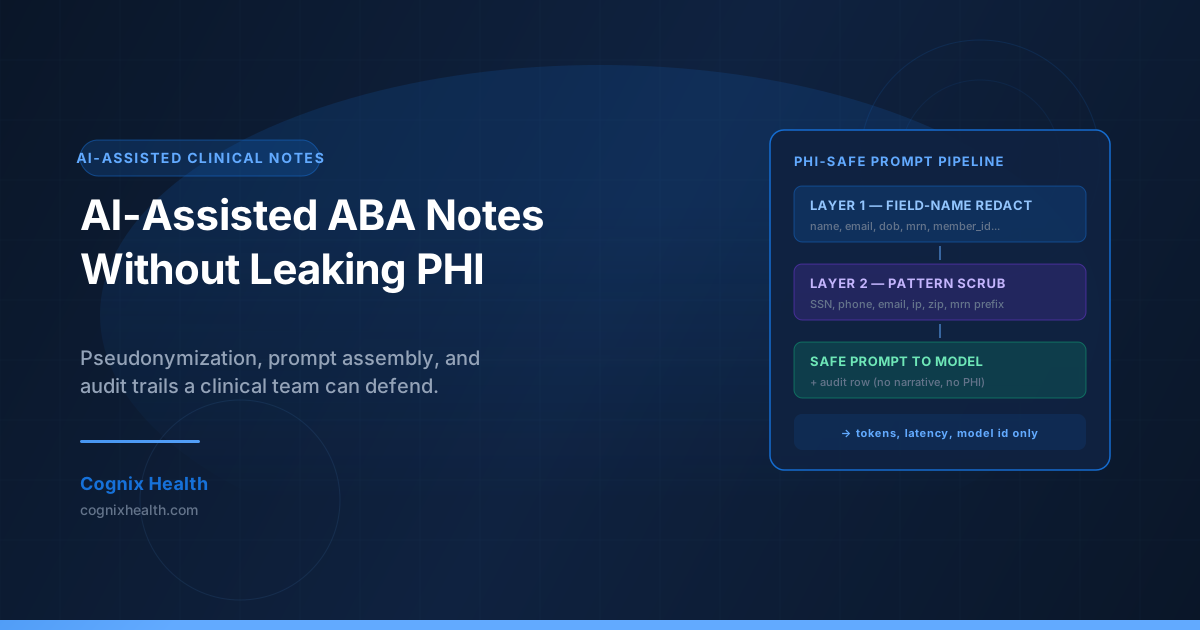
Cognix does not send raw session data to the model. Every record passes through a pseudonymization step that runs in two passes — a key-based redaction and a pattern-based redaction — before the prompt is assembled. The two passes cover different failure modes and are designed to be additive rather than redundant.
Key-Based Redaction: Stop the Obvious
The first pass looks at the field names of the data being sent. If a field is named in a list of well-known PHI keys, the value is replaced with a redaction marker and the original value is never assembled into the prompt. The list covers both naming styles that appear in real forms — the joined style and the underscored style — and includes names that ABA practice management systems often carry without flagging them as identifiers.
The list of field names that get fully redacted includes first and last name in several casings, full name variants, email, phone number, address, street address, city, ZIP code, SSN, date of birth in several casings, MRN, insurance ID, member ID, policy number, client ID, staff ID, user ID, IP address, device ID, and signature. Any field whose name is in this list is removed from the prompt data, regardless of what the value contains. If a future field is added with a name in this list, it is also removed. The list is checked case-insensitively against both the exact key and the lowercased key, so casing drift does not bypass the gate.
This pass is intentionally narrow. A field named “description” is not on the list, because goal descriptions are an essential input to the prompt. A field named “notes” is not on the list, because behavior notes carry the clinical detail the model needs. The key-based layer is the part of the design that says “if a name obviously identifies someone, do not send it at all.”
Pattern-Based Redaction: Catch the Leak Inside the Field
The second pass scans the string content of any value that survived the first pass. Even when a field name is benign, the value can contain an identifier that should not travel. The pattern layer applies six families of regular expressions:
- Social Security Numbers in the form 123-45-6789 or 123456789
- Phone numbers in the common U.S. formats with or without country code
- Email addresses in standard local-part-at-domain form
- Dates of birth in MM/DD/YYYY and MM-DD-YYYY forms
- IP addresses in the four-octet dotted form
- ZIP codes in the five- and nine-digit forms
- Medical record numbers in the common MRN-prefixed form
Each match is replaced with a bracketed redaction marker that preserves the structure of the prompt while removing the identifier. A free-text antecedent note that originally read “transition from Mrs. Patel’s classroom at 9:15 a.m.” becomes “transition from [REDACTED]’s classroom at [REDACTED].” The model still has the context it needs; the identifying strings never leave the clinic.
A seventh pattern catches a different kind of leak: signature data. Any value that starts with a base64 image data URL is recognized as a signature rendering and replaced with a signature redaction marker, so a rendering provider’s signature does not get serialized into a prompt.
Why Two Layers, Not One
A single layer of defense always fails in the same way. Key-based redaction is fast and reliable, but it cannot catch a name that lives inside a description field. Pattern-based redaction catches that, but a regex can miss a name that does not match a known format. Running both in series means an identifier has to slip past two independent checks. The pseudonymization step is intentionally defensive; missing a redaction is the worse error.
The two layers also work recursively. If a top-level field is an array of objects, every object in the array is pseudonymized with the same rules. If a value is an object, every nested key is checked against the list. The output structure mirrors the input structure so the calling code does not have to do anything special with the redacted result — it passes the same shape forward, with the same keys, just safer values.
What the Model Actually Sees
The pseudonymized data becomes the data section of a structured prompt. That prompt has three parts: a system prompt that sets clinical tone and rules, a user prompt that varies by field label, and a data section that is the pseudonymized session record.
The System Prompt
The system prompt is short and constant. It instructs the model to act as a clinical documentation assistant, to write in third person past tense, to use ABA-specific terminology appropriately, to focus on observable behaviors and measurable outcomes, to reference the data the prompt provides, and explicitly to not include any personally identifiable information. The model is told to return only the narrative text — no headers, no labels, no framing language.
The system prompt is the part of the design that sets the model’s behavioral contract. It does the work that the average clinic would otherwise have to enforce through prompt engineering each time, and it keeps the clinical tone consistent across users and organizations.
The User Prompt: Three Instruction Modes
The user prompt varies based on the label of the field the clinician is filling. The supported modes are:
- Session summary or note — the model produces a detailed clinical summary that includes a brief overview of the session, the goals addressed and the progress observed, any notable behaviors or responses, and recommendations or next steps. This is the default mode and applies whenever the field label contains the words “note” or “summary,” or when the label is empty.
- Treatment plan — when the field label contains “treatment plan,” the model produces recommendations organized around current treatment focus areas, recommended interventions, and suggested modifications based on session performance. The recommendations are framed as options to consider, not as instructions to implement.
- Progress summary — when the field label contains “progress,” the model produces a summary that emphasizes goals worked on, current performance levels, trends in behavior or skill acquisition, areas of improvement, and areas needing continued focus.
- Generic — when the label does not match any of the patterns above, the model produces professional clinical content appropriate for the given label, falling back to the same data-driven structure as the summary mode.
The instruction mode is the part of the design that respects the difference between writing a daily note, writing a treatment plan, and writing a quarterly progress review. Each of those is a different kind of clinical artifact, and the prompt shape should match.
The Data Section: Skill Goals, Behavior Goals, and ABC Incidents
After the instruction comes the data. The data section is the place where the structured clinical content from the session is summarized in a form the model can reason about. The conversion is type-aware:
- Skill goals are summarized by target. For each target, the prompt includes the target name, the number of trials attempted, and a percentage correct when the target is scoreable. Targets with zero trials are excluded. A skill goal is presented as a list of targets, each with a denominator and a success rate, not as a free-text goal title.
- Behavior goals of Frequency type are summarized as a single instance count — the sum of the recorded response values across trials. A behavior goal with eleven recorded instances appears as “11 instances” in the prompt. Goals with zero real instances are excluded so the prompt is not cluttered with placeholder trials.
- Behavior goals of Duration type are summarized as a list of per-instance durations formatted as minutes and seconds, with a total duration when more than one instance is recorded. A behavior goal with three recorded durations of 30 seconds, 1 minute, and 45 seconds appears as “Durations (min:sec): 0:30, 1:00, 0:45” with a total of “2:15.”
- ABC incidents are summarized as a numbered list. For each incident, the prompt includes the incident time, the antecedent category and any antecedent notes, the observable behavior description, the intensity and duration when recorded, the consequence category and any consequence notes, the hypothesized function when one is set, the setting, and the activity.
The data section is the part of the design that gives the model something concrete to write about. It is also the part that protects the client: there are no client names, no staff names, no internal identifiers, and no free-text fields that have not been pseudonymized. The model has exactly what it needs to write a good note and nothing it could use to identify the client.
The Observation Session Enrichment
Not every session has direct trial data. Supervision sessions, BCBA observation sessions, and parent-coaching sessions are common parts of an ABA week, and they often do not have their own goal trials. A note for those sessions still needs to say something useful about what was observed.
When a session has no goal data in the request, the system searches for a nearby session with the same client, in the same organization, that has trial data. The search window is two hours before to two hours after the current session’s start time. The session with the closest start time is selected. If that session has trial data, the system builds the goal data and ABC data from the nearby session and flags the prompt as an observation session.
The flag is a short note in the user prompt: “This is an observation/supervision session. The data below is from the parallel direct-care session being observed.” That line prevents the model from treating the data as if it came from the observation session itself. The observation session becomes a frame for the data; the data stays tied to the session where it was collected.
The two-hour window is a clinical judgment. It is wide enough to catch a typical direct-care block that runs in parallel with a BCBA observation, and narrow enough to avoid grabbing unrelated sessions from earlier or later in the day. If no nearby session has data, the prompt is sent without a data section, and the model is asked to write a generic professional narrative. The observation enrichment is a courtesy, not a fabrication: the model is never told to invent data it does not have.
The Audit Log: What Is Recorded and What Is Not
Every generation request writes a row to the AI generation audit log. The row is short and deliberately does not contain the narrative, the prompt, or any field that could identify the client. The columns that are written are:
- The session identifier
- The organization identifier
- The user identifier of the practitioner who triggered the generation
- The field name that was generated
- The model identifier
- The number of input tokens billed
- The number of output tokens billed
- The latency in milliseconds
- The timestamp
That is the full content of the row. The narrative is not stored. The prompt is not stored. The session text is not stored. The audit log is sufficient to answer the question “did anyone generate AI content for this session, on this day, in this organization?” It is not sufficient to reconstruct the narrative or to identify the client. If a regulator asks for proof that PHI was not sent to the model, the audit row is the artifact: it shows the model was called, what was billed, who called it, and when. It cannot be reverse-engineered into the underlying note.
The audit log is also scoped to the organization. Org members can see their own organization’s audit rows, but they cannot see the audit rows of other organizations. The same per-organization access controls that protect sessions protect the audit log, and the audit log writes use a service-level connection so the row is written even if the practitioner’s session token has expired.
If the audit write fails, the generation does not fail. The clinician’s narrative is still returned, the prompt was still pseudonymized, and the model call is already complete. The audit failure is logged as an error so the operations team can investigate, but the more important outcome — that the clinician got their note — is not blocked by an audit row that is supposed to be a backstop, not a gate.
The Button-State Rules
The AI generation button is the part of the interface the practitioner actually touches, and its state has to be predictable. There are six states the button can be in, and they follow a fixed set of conditions.
| Condition | Button state |
|---|---|
| AI capabilities disabled for the organization | Button is hidden entirely |
| No saved text, not yet generated | “Generate AI Summary” — enabled |
| Field was previously AI-generated | “Regenerate AI Summary” — enabled |
| Field has manually-written text | Button is disabled to prevent overwriting clinician judgment |
| Session is published (completed) | Button is disabled — published notes cannot be regenerated |
| A generation is in progress | “Generating…” with a spinner — disabled |
The most important state is the third one: a field with manually-written text gets no AI button at all. The clinician’s words are not at risk of being silently overwritten by a regeneration. The button is a tool for empty fields and AI-generated fields; it is not a tool for editing clinician content.
A second important state is the fourth: a published session cannot be regenerated. Once a note is signed and finalized, the underlying record is treated as the source of truth. The button is removed from the interface, and the server returns an error if a generation request is sent for a published session. This is the part of the design that prevents an after-the-fact rewrite of a finalized note.
The Organization-Level Feature Gate
AI generation is a per-organization capability, not a platform-wide default. Each organization has a flag that controls whether the AI button is visible at all. When the flag is off, the button does not render, any generation request returns a 403, and the audit log is never written. When the flag is on, the button renders for every note field that has a narrative purpose, generation is reachable, and the audit log is written for every call.
The flag is the part of the design that gives the organization a clean way to opt out. A clinic that is not ready to introduce AI into its documentation workflow can leave the flag off and use the rest of the platform without the AI surface. A clinic that wants to introduce AI for a specific service line can leave the flag on and rely on the button-state rules to control which fields use it. A clinic that wants to introduce AI everywhere can leave the flag on and treat the generation as a default helper.
The flag is stored in the same organization record that controls subscription, branding, and other per-tenant settings, and it is exposed in the same admin interface. There is no global toggle, no environment variable that overrides the flag, and no privileged user role that can use AI for an organization that has the flag off.
The Admin Usage Dashboard
When AI is enabled, the organization gets access to an admin usage dashboard. The dashboard answers four questions:
- How much is being generated? Total calls, total input tokens, total output tokens, and total tokens for the selected period.
- How is usage trending? A daily breakdown of calls and tokens, with unique-user counts per day.
- Who is using it? A per-user breakdown of total calls, total tokens, and last used timestamp.
- How fast is it? Average latency per call for the selected period.
The dashboard runs the same four questions over four windows: all time, today, this week, and this month. The questions and windows are the ones a clinical director or operations lead asks when they want to know whether the team is actually using the feature, whether the cost is reasonable, and whether the response time is acceptable.
The dashboard is built from the same audit log that records every generation. Every number on the dashboard is traceable back to a specific audit row. There is no estimation, no smoothing, no client-side fabrication. The dashboard is the analytical view of the audit log, and the audit log is the source of truth for both compliance and analytics.
Best Practices for Using AI Documentation Safely
- Collect the data first, then generate. The model writes a better note from structured data than from a free-text draft. Goals, targets, trials, and behavior counts should be entered before the AI button is pressed.
- Review the generated note as if you wrote it. AI-generated text is a draft. The clinician is responsible for accuracy, completeness, and compliance with payer requirements. Editing is part of the workflow, not a sign of failure.
- Do not paste unrelated PHI into the note before generating. The pseudonymization step catches identifiers in the data, but it cannot defend against identifiers typed directly into the field by the clinician. Treat the field as if it were already signed.
- Use the right instruction mode for the artifact. A daily note, a treatment plan, and a progress review are different documents. Match the field label to the artifact, and let the prompt assembly match the field.
- Regenerate only when the underlying data has changed. A generation should be triggered by new information, not by aesthetic preference. Each generation adds a row to the audit log, and the log should reflect meaningful use.
- Prefer empty fields for generation. A field with clinician-written text disables the AI button. The design treats clinician words as the higher-trust content; let the AI fill the empty fields and keep your own edits.
- Keep the org-level flag aligned with policy. If the organization’s policy is to use AI for service summaries but not for treatment plans, the flag should reflect the policy, and the template should reflect the flag.
- Read the AI guidelines page for your organization. The guidelines page is the part of the platform that says what the AI is for, what it is not for, and what the clinician is responsible for. The guidelines are not boilerplate; they are the operating contract.
- Treat the audit log as compliance evidence. The audit row is the artifact a regulator will see. If a row is missing, the generation should be re-run. If a row is unexpected, the generation should be reviewed.
- Use the usage dashboard, not your gut, to make adoption decisions. Token counts, call counts, and per-user breakdowns are the inputs to a clinical operations decision. Impressions are not.
Common Mistakes and How to Avoid Them
How Cognix Health Supports AI-Assisted ABA Documentation
Cognix Health treats AI as a documentation accelerator, not a documentation replacement. The platform is built so that pseudonymization, prompt assembly, and audit happen in the same transaction that returns the narrative, and so that the clinician remains the final reviewer of every field.
The workflow includes:
- Two-layer pseudonymization — field-name-based redaction for the obvious identifiers, and pattern-based redaction for the identifiers that hide inside narrative fields, with both layers running recursively across nested objects
- Three instruction modes — summary, treatment plan, and progress — selected automatically from the field label, with a generic fallback for unlabeled narrative fields
- Type-aware data conversion — skill goals summarized by target with trial counts and percentages, behavior goals summarized as frequency counts or duration lists, and ABC incidents summarized as a numbered observation record
- Observation session enrichment — when a supervision or observation session has no direct data, a nearby parallel session is searched within a two-hour window and flagged in the prompt so the model treats it correctly
- Org-level feature gate — every organization can opt in or opt out, the flag is stored alongside other tenant settings, and the AI button disappears entirely when the flag is off
- Audit log without narrative — every generation writes a row with session, organization, user, field name, model identifier, and token counts, and never writes the narrative, the prompt, or any client identifier
- Button-state rules — six predictable states covering empty fields, AI-generated fields, manually-written fields, published sessions, in-progress generations, and organizations without the feature flag
- Admin usage dashboard — per-organization analytics with all-time, today, this week, and this month windows, plus a daily trend and a per-user breakdown
The goal is to keep the clinician in the loop. The model drafts; the clinician edits; the audit row records the draft. The narrative is never assumed to be correct just because the model wrote it, and the platform never assumes the model is safe to use just because the provider is well known.
Want to see how AI-assisted documentation fits your clinical workflow? Contact Cognix Health to schedule a demo.
Frequently Asked Questions
Does the AI ever see the client’s name or other identifying details?
No. Before any data is sent to the model, it passes through two layers of redaction. The first layer replaces any value whose field name matches a known PHI key with a redaction marker. The second layer scans the remaining text values and replaces any string that matches a Safe Harbor pattern — Social Security numbers, phone numbers, emails, dates of birth, IP addresses, ZIP codes, or MRN prefixes — with a redaction marker. The clinician can see the redaction in the audit log because the audit log records only metadata, not the original text.
What model does Cognix use, and where does the prompt travel?
Cognix uses Claude Sonnet 4.5 served through Google Cloud Vertex AI. The model is reached over a service-account-authenticated connection from Cognix’s own cloud environment, so prompts do not leave a contracted environment for a third-party consumer tool. The default region is configured per deployment, with a sensible default of United States coverage for HIPAA-aligned workloads.
Can AI generate a note for a published session?
No. The button is disabled for any session that is already published, and any generation request for a published session returns a 400 error. The published note is treated as the source of truth, and the platform does not support silent rewrites of finalized content.
What happens if a clinician has already written some text in the field?
The AI button is disabled for any field with manually-written text. The design treats clinician-written text as the higher-trust content, and it does not allow the AI to overwrite it. If the clinician wants to start over, they can clear the field, and the button becomes available again.
Is the AI generation allowed for every organization?
No. Each organization has a flag that controls whether AI generation is available at all. The flag is set per organization, and the AI button is hidden entirely when the flag is off. A clinic that does not want AI in its workflow can keep the flag off and use the rest of the platform normally.
What if the audit log write fails after a successful generation?
The generation still returns the narrative. The audit failure is logged as an error so the operations team can investigate, but the audit row is a backstop, not a gate. The more important outcome — the clinician receiving a usable note — is not blocked by a backstop failure.
Can the AI help with observation sessions that have no direct data?
Yes. When a session has no goal data, the system searches for a nearby session for the same client in the same organization within a two-hour window. If a nearby session has data, the goal data and ABC data are pulled from that session, and the prompt is flagged as an observation session so the model understands the data is from a parallel direct-care session.
How are token counts and latency measured?
Every generation request measures the start time, the input tokens billed by the model, the output tokens billed by the model, and the end time. Those four values are written to the audit log as integer counts and a millisecond latency. The admin usage dashboard aggregates them across calls, days, and users for the selected organization.
Can the model recommend a treatment plan?
The model can summarize data and suggest language, but it does not replace clinical judgment. Treatment plan recommendations belong to the supervising BCBA, and the AI generation is positioned as a draft that the BCBA reviews and edits. The prompt includes an instruction to produce recommended interventions, but the language is framed as options to consider, not as instructions to implement.
Does the audit log show what the model was told?
No. The audit log records what was billed and when, not what was sent. The pseudonymization step is the layer that ensures the prompt is safe, and the audit log is the layer that records the call happened. Showing the prompt in the audit log would defeat the purpose of the pseudonymization, because the log itself would then need to be redacted.
What happens when a generation is in progress?
The button shows a “Generating…” label with a spinner, and it is disabled. Multiple generations cannot be triggered in parallel from the same field, and a generation that takes longer than the configured timeout is treated as a failure and surfaced as a user-visible error.
How does the platform handle the case where a generation returns an empty or malformed response?
The model response is parsed for text blocks. If no text block is present, the generation returns an empty narrative and the practitioner is asked to write the field manually. A generation that returns a malformed response does not corrupt the underlying session data, and the audit log records the call regardless of whether the response was usable.
This guide reflects Cognix Health AI-assisted documentation as of July 2026. Clinical teams should use their organization’s AI policy, supervision procedures, documentation standards, and applicable payer requirements when enabling or using AI generation. The AI tool is a documentation assistant, not a documentation replacement. For questions about how Cognix Health supports safe AI documentation for ABA workflows, reach out to our team at [email protected].